Network Switch Troubleshooting: Isolate the Failure Before Changing Configuration
Diagnose switch incidents through scope, physical evidence, forwarding state, routing, congestion and controlled corrective actions.
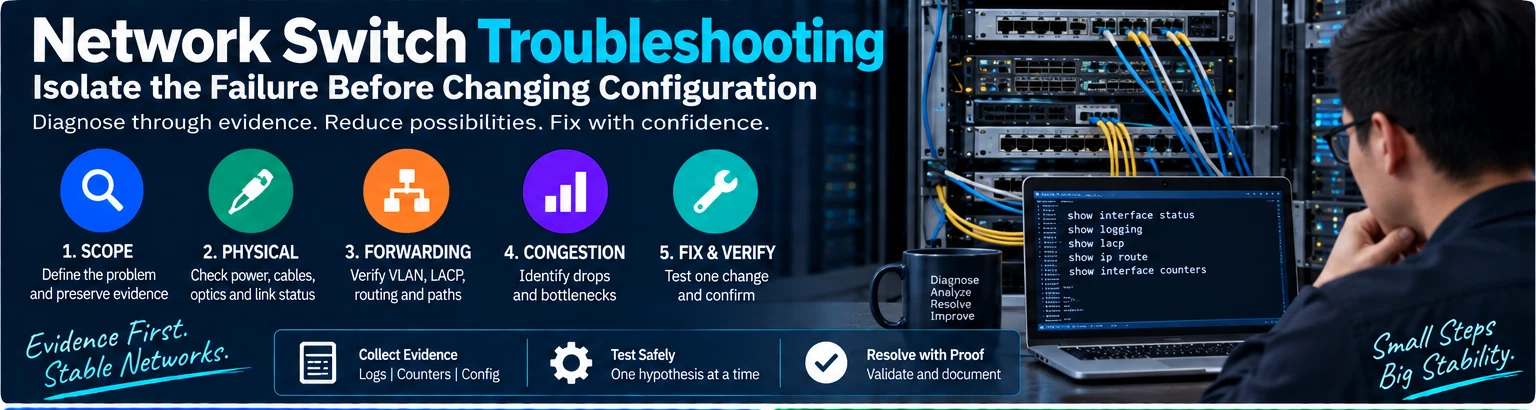
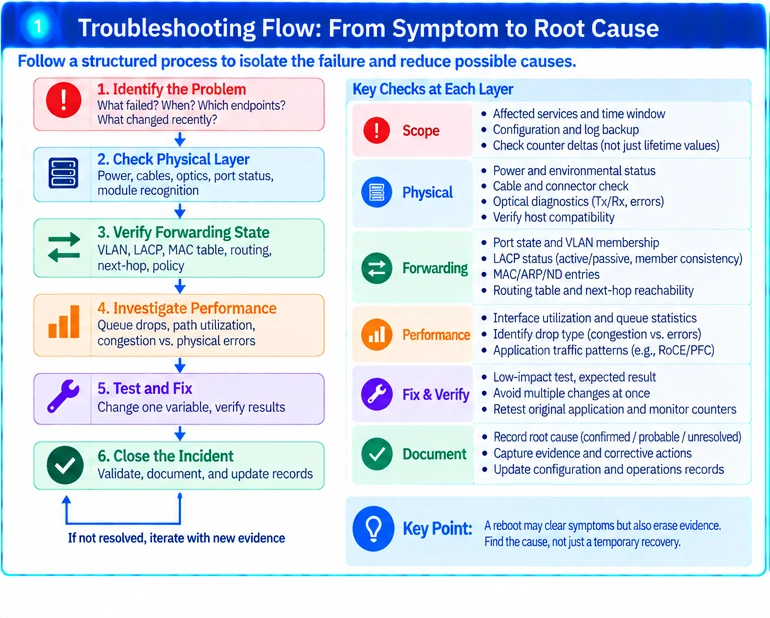
Effective switch troubleshooting reduces the number of possible causes before changing the system. Begin with the affected service and a time window, then move through physical, forwarding and control-plane evidence. A reboot may erase useful information without addressing the underlying cause.
1. Define scope and preserve evidence
Record what failed, when it began, which endpoints are affected and what changed recently. Distinguish one port, one VLAN, one route or the entire device. Capture the current configuration version, relevant logs and interface counters before resetting anything.
Use counter deltas over a defined interval. A large lifetime error count does not prove that errors are occurring now; a small but rapidly increasing count may be more relevant.
2. Start with the physical path
Confirm power and environmental status, cable identity, port mode and module recognition. For optics, review supported diagnostics and the complete channel. Verify host compatibility when a recent module or cable change is involved. R49
A link-up state does not prove a clean channel. Correlate errors, flaps and optical observations with the incident interval.
3. Follow the forwarding path
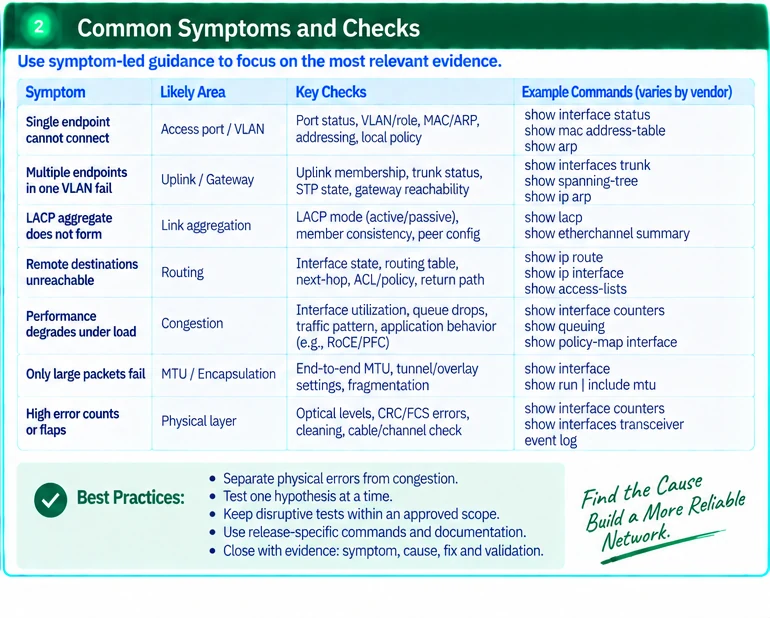
| Symptom | Evidence to examine |
|---|---|
| One endpoint fails | Port state, VLAN/role, address resolution and local policy |
| Several endpoints in one segment fail | Uplink membership, forwarding state and gateway reachability |
| Aggregate is unavailable | LACP peer, member consistency and actual bundled state |
| Only remote destinations fail | Routing, next-hop resolution, policy and return path |
| Performance degrades under load | Queue drops, path utilization and application concurrency |
| Only large packets fail | End-to-end MTU and encapsulation assumptions |
For LACP, confirm compatible negotiation roles and member properties; two passive ends do not initiate negotiation. R53
4. Separate congestion from physical errors
Drops caused by queue pressure require a different investigation from physical-layer corruption. Determine where the traffic accumulates and whether the symptom follows a particular path or workload. Do not assume that increasing a port rate or changing buffers resolves every loss condition.
For RoCE or other specialized traffic, review the approved queue and flow-control design before changing it. Release-specific PFC guidance does not justify enabling broad flow control as a generic repair. R24
5. Test one hypothesis at a time
Choose a low-impact test that distinguishes likely causes: a known-qualified spare path, a controlled endpoint comparison or an approved configuration correction. Record the expected result before performing it.
Keep disruptive saturation, fault and reboot tests within an authorized scope. Laboratory benchmark methods are not automatically safe for live production networks. R47
Avoid changing several variables simultaneously. If the service recovers after multiple unrelated changes, the root cause may remain unknown and the incident may recur.
6. Close the incident with evidence
Verify the original application, observe the relevant counters over a suitable interval and confirm that no unintended service was affected. Record the cause as confirmed, probable or unresolved according to the evidence.
Update the component, configuration or operating record that failed. A useful incident report links symptom, evidence, corrective action and validation. It should not replace uncertainty with an unsupported statement that restarting the switch fixed the hardware.
Engineering illustrations
These figures illustrate the design concepts discussed here. They are not measured results, certified configurations or a supplied-equipment list.