
10G, 40G and 100G Short-Link Selection: DAC, AOC and SR-BD Checks
Select short interconnects with exact host support, routed length, breakout mode and optical-interface compatibility.
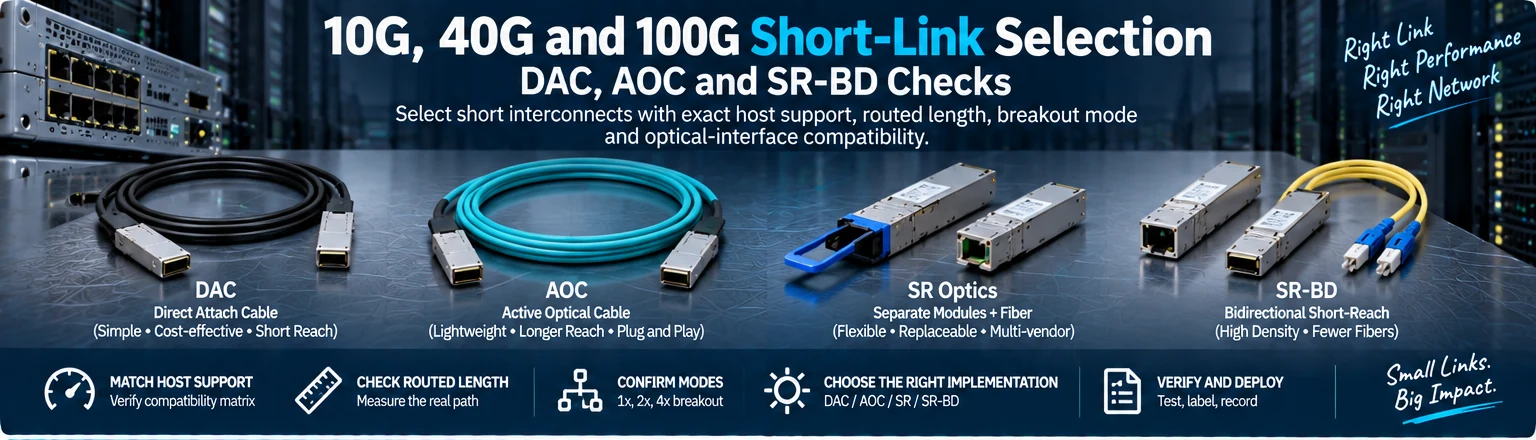
Use this guide to select a short connection between identified hosts. It covers direct-attach cables, active optical cables and separate optical modules, including bidirectional short-reach options where supported. The selection unit is the complete link, not the cheapest item at the target rate.
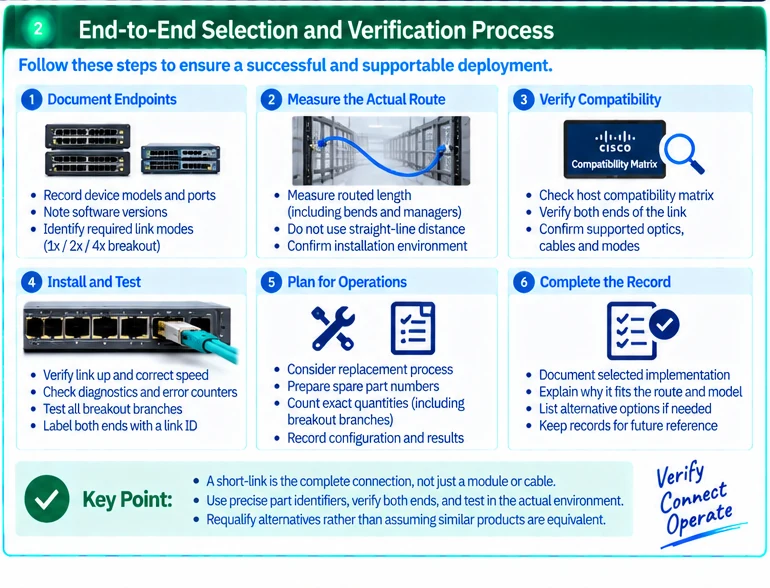
1. Record endpoints and route
Capture both device models, port identifiers, software baselines and required logical modes. Measure the installed cable path, including managers and service allowance. Do not substitute straight-line rack distance for the routed length.
For a breakout, record the parent port and every child interface. Verify that the host supports the required split mode before selecting the assembly.
2. Choose the implementation
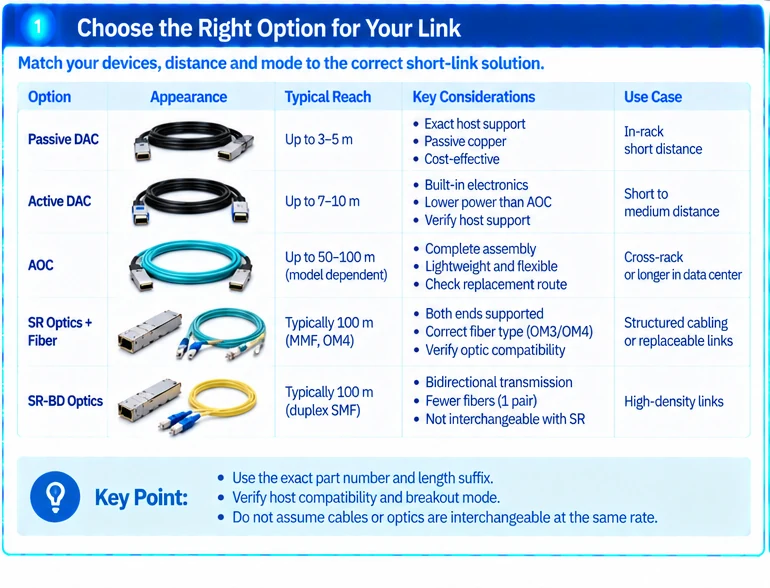
| Option | Check before selection |
|---|---|
| Passive or active DAC | Exact host support, cable type, length and mode |
| AOC | Supported complete assembly and a practical replacement route |
| Separate optics and fiber | Both optical interfaces plus the complete channel |
| Bidirectional short-reach optics | Supported peer implementation, fiber and connector conditions |
Do not apply one universal distance rule to every cable family. Individual parts and their host support define the usable arrangement. R18R25
3. Keep optical names precise
A bidirectional optical implementation is not interchangeable with every other optic at the same rate. Confirm the actual transmission specification and peer requirements; an LC connector or a familiar short-reach label is not enough.
Likewise, a passive MPO-to-LC assembly does not convert the wavelengths or signaling of one optical interface into another. It maps fibers. Parallel and duplex designs require their own supported endpoint arrangements. R42
4. Preserve the complete part identifier
Record the exact length suffix and relevant hardware revision. Cisco’s documentation distinguishes cable variants and qualification conditions, so abbreviating a cable to its base family can remove information needed for support. R18
Use the host compatibility matrix independently of the optical-channel check. A supported local module still needs a compatible remote interface and physical path. R49
5. Review serviceability and quantity
For fixed assemblies, determine how replacement affects both ends and the route. For separate optics, count modules and fiber segments from the actual link map. For breakouts, count logical branches separately from assemblies.
An illustrative rack with twelve required links does not necessarily need twelve identical cable assemblies if some connections use a supported breakout or structured path. The final quantity must come from the port schedule.
6. Verify the installed connection
Confirm recognition and operating mode, inspect diagnostics where available and compare error-counter changes under agreed traffic. Check all intended breakout branches. Label both ends with a stable link ID and retain the exact configuration.
The completed record should identify the selected implementation and explain why it fits the route and maintenance model. Alternative parts should be requalified rather than accepted solely because their speed and nominal length appear similar.
Engineering illustrations
These figures illustrate the design concepts discussed here. They are not measured results, certified configurations or a supplied-equipment list.
Related reading
- Short-Reach Network Links: Choosing DAC, AOC or Separate Optics
- Why a Cable-Length Suffix Can Change the Product You Are Buying
References
可直接使用的项目资料
按当前任务选择资料。可以先提交已有清单,后续再补缺项。下载模板为英文。