
AI & HPC networks
Which ConnectX-6 Dx card fits a 25G or 100G server refresh?
Compare OPN, PCIe resources and complete Ethernet channels for a 25G or 100G refresh.
Two adapters from the same family can occupy different slot resources and expose different networking interfaces. A server refresh should qualify the exact ordering part number against the server and switch, rather than assume the family’s maximum rate applies to every card.
The short answer
Choose the required ports first, then match the exact card’s connector, electrical PCIe width, cooling and software. Qualify the chosen cable or optic at both ends, including the applicable port mode and FEC configuration.
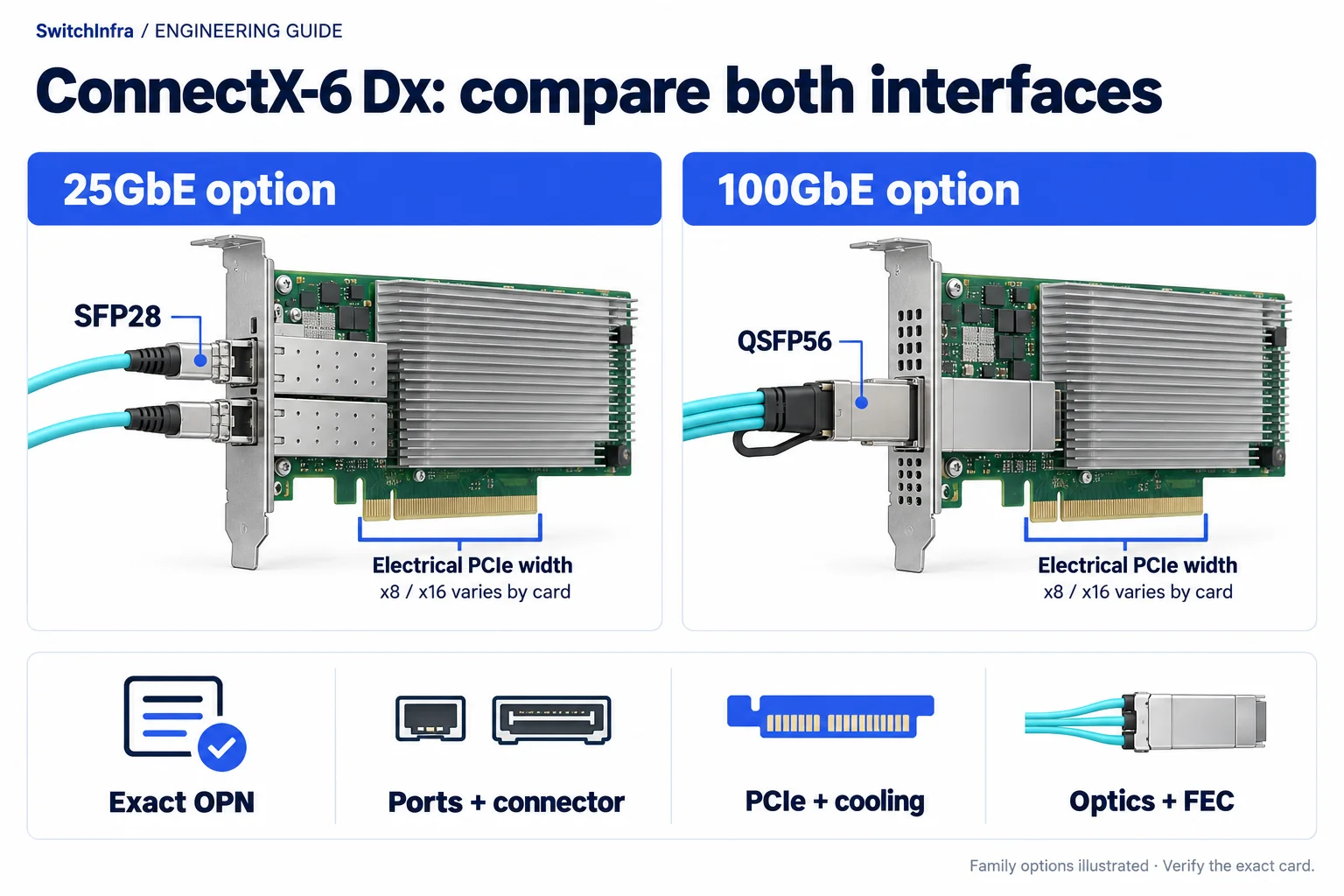
Choose the NIC variant by network rate, connector and its documented PCIe requirements, then match optics and host support. Conceptual illustration; equipment shapes are illustrative.
Official technical sources · Independent analysis by SwitchInfra
This is a documented design analysis, not a customer deployment claim. Candidate roles require verification for your configuration.
25GbE — SFP28 card examples
100GbE — QSFP56 card example
x8 / x16 — card-dependent PCIe width
OPN — selection unit
What the technical reference establishes
The manual lists MCX621102AC-ADAT as dual-port 25GbE SFP28 with PCIe Gen4 x8, and MCX623102AC-ADAT as a dual-port 25GbE x16 alternative. MCX623106AC-CDAT is a dual-port 100GbE QSFP56 x16 example.
The 100G example maps to public catalog order code 900-9X6AG-0086-ST0. This establishes a listing, not stock or server compatibility. Qualify the server slot, mechanical space and supported configuration before ordering.
ConnectX-6 Dx card configurations
Ports — Family members have different port counts and connectors.
Host interface — The listed examples include x8 and x16 configurations.
Security — Secure-boot and crypto attributes vary by OPN.
Unknown — The proposed server, peer switch and software remain unspecified.
Scope of the analysis: Independent selection analysis of official NVIDIA documentation. Proposed examples are not a deployed customer project or a SwitchInfra delivery.
Work through the engineering choices
Start with the documented constraint, then state the conditions for the proposed equipment role.
Select the service and exact adapter together
The manual lists distinct 25G and 100G ordering configurations.
Design exercise: Proposed comparison: two 25G connections versus two 100G connections.
State whether two ports are needed for separate fabrics, redundancy or aggregate capacity. Those objectives lead to different switch and software requirements. Do not assume that a two-port card guarantees twice the application throughput, or that a bonded pair protects against loss of the host itself.
Keep the full OPN in every quotation and substitution request. Record whether security features are required rather than inheriting them from a family marketing description. If a substitute suffix is offered, compare its documented attributes and support position before treating it as the same item.
ConnectX-6 Dx card configurations
MCX621102AC-ADAT
Dual 25GbE SFP28 example
PCIe Gen4 x8 reference; confirm server fit and offered security features.
MCX623102AC-ADAT
Dual 25GbE SFP28 comparison
PCIe Gen4 x16 reference; not identical to the x8 card.
Dual 100GbE QSFP56 example
Catalog order code 900-9X6AG-0086-ST0. PCIe Gen4 x16; select supported media and software.
Check the server side before selecting the external cable
The hardware documents distinguish card interfaces and installation requirements.
Design exercise: Proposed task: obtain the server slot and riser map.
A slot that looks mechanically long may have fewer electrical lanes or share resources with another device. Confirm the generation and width actually available to the installed card, the riser’s supported power and the server vendor’s approval. Budget the host path alongside the network service.
Review bracket height, neighboring cards and airflow. A card that fits an empty chassis may become difficult to cool or cable after accelerators are populated. Request the offered server configuration and its integration notes, then test both intended ports under simultaneous traffic rather than validating one in isolation.
ConnectX-6 Dx interfaces · ConnectX-6 Dx specifications
Qualify the complete Ethernet channel
The family supports several connector and link configurations.
Design exercise: Proposed task: write one peer-to-peer channel record for each adapter port.
Identify the switch port, configured rate, media, routed length and any patch panels. Match the exact cable or optical PMD at both ends. A QSFP-shaped interface does not by itself prove the electrical lane mapping or a supported operating rate with the selected peer.
Confirm the applicable FEC and link settings from the supported combination, then record the active values at acceptance. Retain traffic and error results alongside firmware and driver versions. A link-up indication is an initial check; it does not demonstrate sustained service, correct offloads or the required recovery behavior.
ConnectX-6 Dx card configurations · ConnectX-6 Dx interfaces
Make the RFQ specific enough to compare substitutions
A useful request ties the adapter OPN to its server slot and its two remote channels. This makes a change in card suffix, cable type or port configuration visible before delivery.
ConnectX-6 Dx card configurations
Adapter
Exact OPN, bracket, required security features and port purpose.
Server
Riser, lane width, generation, power, airflow and vendor approval.
Network
Switch peer, PMD, channel length, FEC and acceptance traffic.
Candidate models and selection boundaries
These are conditional model or product-family inquiries for the documented equipment roles. Confirm the required rate and complete channel before finalizing any line.
| Model / family and status | Role and condition |
|---|---|
| MCX621102AC-ADAT Conditional model / family inquiry | Dual 25GbE SFP28 example PCIe Gen4 x8 reference; confirm server fit and offered security features. ConnectX-6 Dx card configurations |
| MCX623102AC-ADAT Conditional model / family inquiry | Dual 25GbE SFP28 comparison PCIe Gen4 x16 reference; not identical to the x8 card. ConnectX-6 Dx card configurations |
| MCX623106AC-CDAT Catalog SKU: 900-9X6AG-0086-ST0 Listed model; conditional candidate | Dual 100GbE QSFP56 example Catalog order code 900-9X6AG-0086-ST0. PCIe Gen4 x16; select supported media and software. ConnectX-6 Dx card configurations |
Rows with product IDs are mapped to the exact listed model or ordering variant checked on 19 October 2026. Remaining rows are model or family inquiries. A public listing does not establish stock, offered condition, supply or project compatibility.
Continue in the relevant product family
Use the analysis to define the role before comparing catalog options.
Discuss this project
Carry the route, media, endpoint and loss requirements into the inquiry. Leave unknown quantities blank; reference port and fiber counts are not an equipment BOM.
Follow the next selection question.
Compare related decisions while keeping each source’s scope, hardware and link conditions separate.
Browse more engineering analyses →
H100 SuperPOD: four fabrics, four connection schedules
Keep compute, storage, service access and OOB management distinct before counting equipment.
Read the engineering analysisOfficial technical source
HGX Spectrum-X: separate SuperNIC and DPU duties
Keep GPU communication, converged services and management distinct in the node and fabric BOM.
Read the engineering analysisOfficial technical source
BlueField-3: include management and recovery in the BOM
Separate data ports, OOB access, RShim and server power requirements.
Read the engineering analysisOfficial technical source
Before you finalize the channel
Is every ConnectX-6 Dx card a 200G card?
No. The exact OPN determines its port configuration and rates.
Are the x8 and x16 25G examples identical?
No. Their host interfaces and physical specifications must be compared.
Does a family support statement certify the server?
No. Obtain the supported server, firmware and driver combination.
Are these exact parts in stock?
The 100G model has a mapped public listing; actual stock, supply and compatibility remain unverified.
Trace the project facts and technical limits
Source check: 19 October 2026. Catalog status is stated per candidate.
Official sources read 19 October 2026. Project-specific engineering review, firmware support, exact offered parts and supply remain unconfirmed.