SFP+, QSFP28 and QSFP-DD Selection: Form Factor Is Only the First Filter
Select pluggable interfaces by supported host mode, signaling, optical specification and complete channel rather than connector family alone.
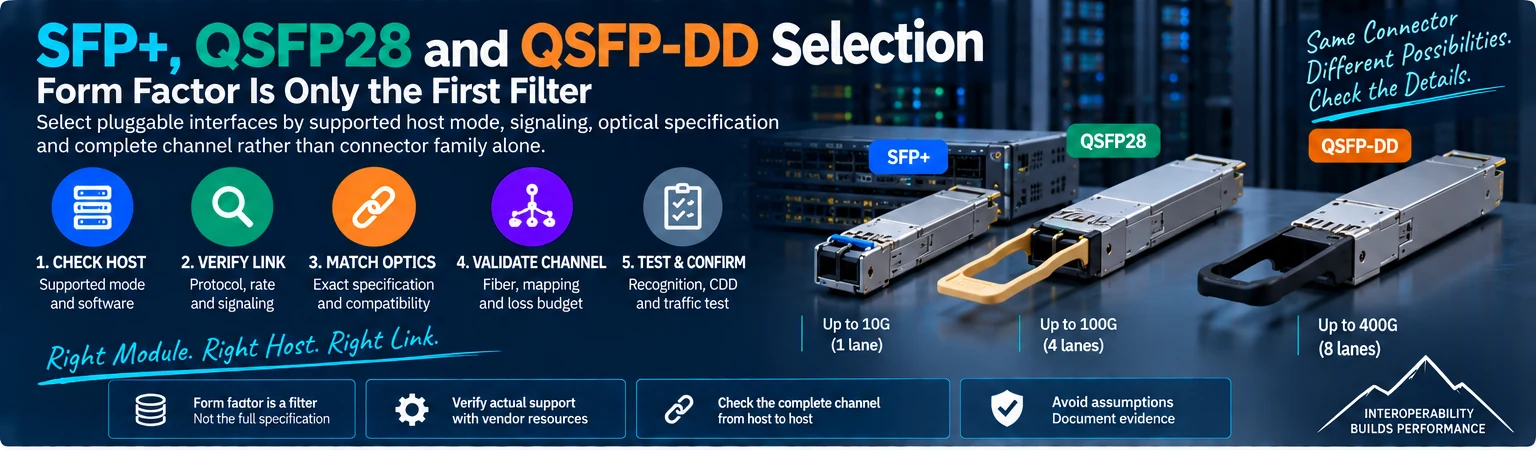
SFP+, QSFP28 and QSFP-DD identify interface families, not complete end-to-end link specifications. They help narrow a selection, but do not establish protocol, optical reach, peer compatibility or support in a particular host. Use form factor as the first filter, then qualify the complete connection.
1. Start with the host port
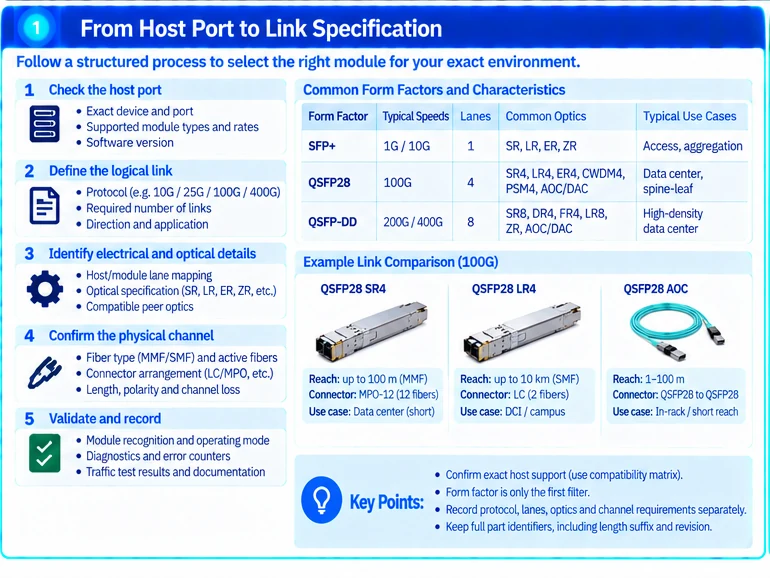
Record the exact device, port, supported mode and software baseline. Determine which module types and operating rates are supported in that context. A larger or mechanically compatible cage does not authorize every smaller or similarly shaped module. R49
Keep the host’s electrical interface and the module’s optical interface conceptually separate.
2. Identify the logical link and implementation
| Selection layer | Question |
|---|---|
| Form factor | Does the host support this module family and variant? |
| Logical interface | What protocol and rate does each link carry? |
| Electrical lanes | Does the supported host/module mode match? |
| Optical implementation | Are both ends compatible in transmission and reception? |
| Physical channel | Is fiber, mapping, reach and loss suitable? |
| Thermal/power | Does the host support the module’s installation requirements? |
Examples in vendor catalogues show why the same nominal rate can use different optical arrangements. Read the exact specification, not only the product-family heading. R18R25
3. Do not infer breakout from connector shape
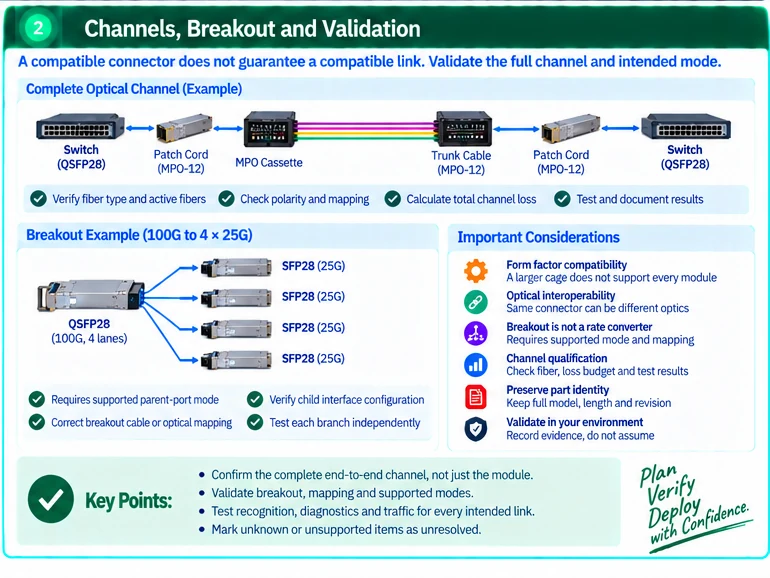
A breakout requires a supported parent-port mode, suitable assembly or optical mapping and compatible child interfaces. It is not a universal rate converter. Likewise, an aggregate module capacity may describe multiple logical links rather than one link at that rate. R01
An illustrative selection record should therefore store physical cage count, logical link count and branch mapping separately. This avoids purchasing the correct number of connectors but the wrong number of usable interfaces.
4. Match the optical channel
Confirm fiber medium, active fiber count, connector arrangement, polarity and permitted channel loss. Two modules using the same connector can still implement incompatible optical specifications.
Multi-fiber trunks and cassettes redistribute physical paths. Their mapping must match the active interface, and they do not convert wavelengths or signaling formats. R42
5. Preserve exact part identity
Keep the full module or cable identifier, length suffix and relevant revision. Distinguish host coding or support claims from optical interoperability. A vendor’s compatibility statement should be evaluated for its stated scope, not expanded to every host in the same brand family.
Mark unknown peer optics, unsupported host modes and incomplete channel records as unresolved rather than guessing.
6. Validate the installed path
Confirm recognition and actual operating mode, then inspect diagnostics and error-counter changes under agreed traffic. For optical channels, retain the required inspection and test results. Test every intended breakout branch and record the installed configuration.
The final output should answer which two hosts are connected, by which exact components, in which mode and on what evidence. That is a more reliable selection method than equating a form-factor acronym with a universal speed or reach.
Engineering illustrations
These figures illustrate the design concepts discussed here. They are not measured results, certified configurations or a supplied-equipment list.