
Network engineering
Office Network Design for Growing Businesses: Capacity Without Unnecessary Complexity
Build a manageable business-office network with clear access roles, PoE budgets, uplink headroom and a practical recovery plan.
A growing office needs a network that can add users and devices without becoming difficult to support. The objective is enough capacity and appropriate separation, with a recovery procedure the available team can execute. A large-campus architecture is not automatically the right model for a single office.
Count services, not only employees
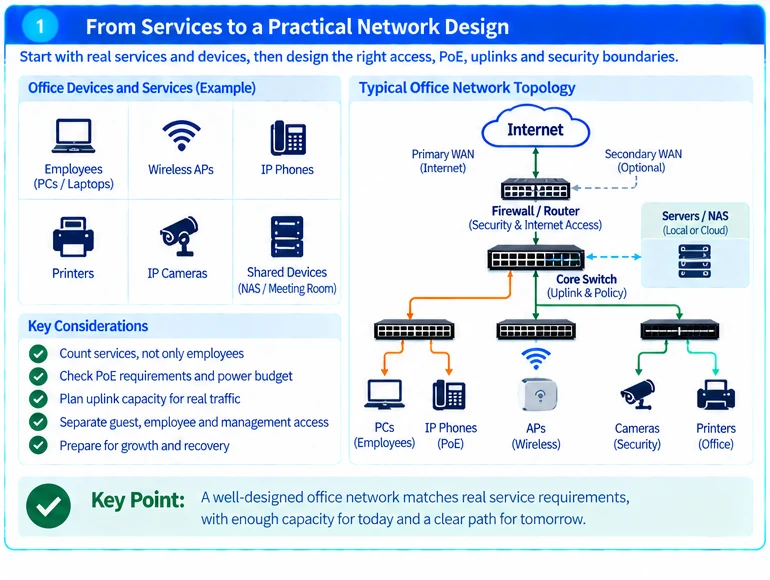
Inventory wired workstations, APs, phones, printers, cameras and local infrastructure. Record which devices require PoE and which services depend on local servers or cloud access. Include uplink and management interfaces separately from user-facing ports.
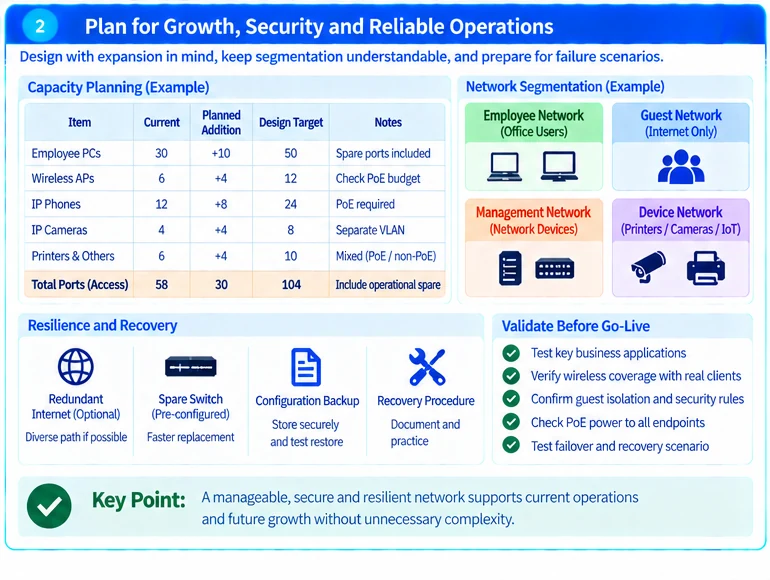
For an illustrative office, thirty employee positions may coexist with six APs, twelve phones, four cameras and several shared devices. Employee count alone would materially understate the port and power requirement.
Reserve the next meaningful growth step
Calculate current ports, known additions and operational spare capacity. Explain what the reserve is intended to accommodate. An unused port that cannot supply the required power or media is not useful capacity for every future endpoint.
| Design item | Practical requirement |
|---|---|
| Access switching | Correct ports and a documented expansion method |
| PoE | Endpoint allocations within the available budget, including failure assumptions |
| Uplinks | Capacity for the office’s actual concurrency and shared services |
| Wireless | Coverage and application behavior validated with real clients |
| Security boundary | Controlled guest, employee, device and management access |
| Recovery | Configuration backups, known spares and an accessible procedure |
Switch power-supply rating and available endpoint power are different quantities. Use the documented PoE budget and endpoint requirements instead of treating nominal PSU wattage as fully available to devices. R32
Keep segmentation understandable
Separate guest access and infrastructure management from ordinary employee connectivity. Add further boundaries where a defined service or risk justifies them. Avoid creating numerous segments without owners or a maintainable rule set.
Being connected to an internal network should not automatically authorize access to every application. Network controls and application authentication have different responsibilities. R35
Choose resilience that can be tested
Identify the failures with the greatest business impact. A second internet circuit may not help if both depend on the same unprotected device or power source. A spare access switch is useful only when its configuration and replacement process are available.
Campus design principles can inform access and aggregation choices, but adapt them to the office’s scale and operating staff. R45
Hand over a network the office can operate
Document addressing, device ownership, administrative access, configuration backups and support contacts. Test critical business applications, guest isolation, endpoint power and the agreed recovery scenario before acceptance.
The result should be a clear growth path rather than a promise of unlimited scalability. A useful project brief includes the endpoint inventory, office layout, business applications, expected additions and the outage duration the organization can tolerate.
Engineering illustrations
These figures illustrate the design concepts discussed here. They are not measured results, certified configurations or a supplied-equipment list.
Related reading
- Network Switch Selection Worksheet: Turn Requirements into a Comparable Shortlist
- Small-Office Wi-Fi: Reliable Coverage with a Supportable Wired Foundation