Understanding PoE Switches: PoE vs PoE+ vs PoE++ Explained

Understanding PoE Switches: PoE vs PoE+ vs PoE++ Explained

In modern enterprise networking, the traditional approach of running separate cables for data and electricity to power remote devices is becoming obsolete. The integration of Power over Ethernet (PoE) has revolutionized how organizations deploy IP phones, Wi-Fi access points, and security cameras. However, with the evolution of technology and energy demands, understanding the nuances between different power standards is essential for network engineers and IT buyers. This guide provides a comprehensive deep dive into the PoE switch market, specifically analyzing the differences between PoE, PoE+, and PoE++, and how to choose the correct solution for your infrastructure.

The Evolution of Power over Ethernet

Power over Ethernet technology allows a standard Ethernet cable to carry electrical power to networked devices. This eliminates the need for a separate power source at the end of the network. While the fundamental goal remains the same—delivering power safely and efficiently over twisted-pair copper cabling—the standards have evolved to meet higher energy demands.

When selecting a network switch, it is crucial to recognize that not all switches are created equal. A standard unmanaged or managed PoE switch operates based on specific IEEE (Institute of Electrical and Electronics Engineers) standards. These standards dictate the maximum power budget available to the ports on the switch.

Breaking Down the Standards: PoE vs PoE+ vs PoE++

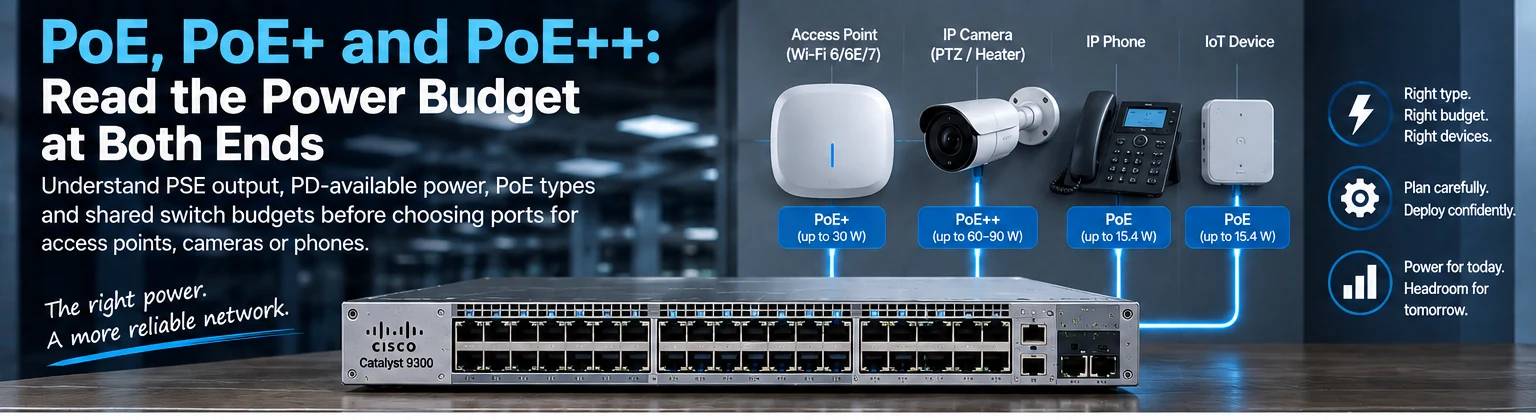
To make an informed purchasing decision, you must understand the three primary classes of PoE standards. These are often referred to by their generation names: 802.3af, 802.3at, and 802.3bt.

IEEE 802.3af (PoE)

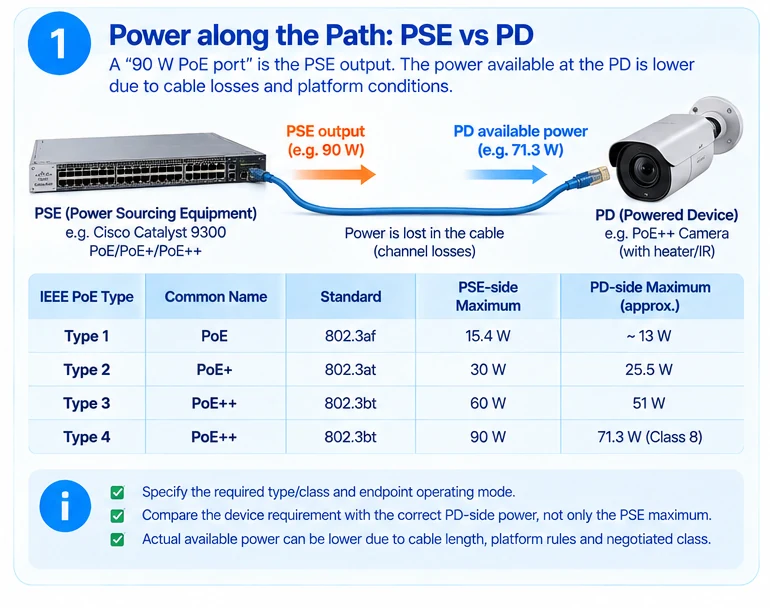
The original PoE standard, defined as IEEE 802.3af, was established to provide power to basic network devices. It delivers a maximum of 15.4 Watts per port. However, the device itself receives only 12.95 Watts because the switch needs to keep power for its own internal electronics.

  • Use Case: IP phones and older IP cameras.
  • Limitation: Modern high-performance Wi-Fi access points often require more than 15 Watts, making standard PoE insufficient for their needs.

IEEE 802.3at (PoE+)

The second generation, PoE+ (also known as 802.3at), significantly increased the power capacity. It delivers up to 30 Watts per port (25.5 Watts to the device). This standard was designed to support higher power consumption devices such as outdoor Wi-Fi Access Points (APs) and video surveillance systems.

  • Use Case: VoIP phones, advanced IP cameras, and standard Wi-Fi 5 or Wi-Fi 6 APs.
  • Requirement: Requires a dedicated PoE+ port or a switch with a high enough total power budget.

IEEE 802.3bt (PoE++)

The latest iteration, PoE++ (802.3bt), introduces Type 3 and Type 4 power classes. This standard brings power delivery to new levels to support industrial and smart building applications.

  • Type 3 (up to 60W): Ideal for LED lighting, high-resolution PTZ cameras, and advanced access points.
  • Type 4 (up to 90W or 100W): Supports the highest power devices, such as digital signage, smart lighting systems with dimming, and ruggedized industrial sensors.
  • Requirement: Devices must support Type 4 to fully utilize 90W/100W capabilities.

Technical Comparison of Power Standards

The following table summarizes the technical specifications and device requirements for each standard. This is critical when reviewing the datasheet for an enterprise network switch.

Standard Common Name Max Power Per Port Device Power Received Typical Applications
802.3af PoE 15.4 Watts 12.95 Watts Basic IP Phones, Low-res Cameras
802.3at PoE+ 30 Watts 25.5 Watts Mid-range Wi-Fi APs, Security Cameras
802.3bt Type 3 PoE++ 60 Watts 51 Watts Digital Signage, LED Lighting
802.3bt Type 4 PoE++ 90W / 100W 71W / 96W Smart Lighting, High-power Sensors

Compatibility and Negotiation Protocols

A common misconception is that a higher standard switch cannot power a lower standard device. In reality, PoE switches utilize a negotiation process (typically via LLDp-MED or CDP) to determine the required power. If a PoE++ switch detects a legacy PoE (15.4W) device, it will automatically adjust its output to the compatible limit. This ensures backward compatibility.

However, a reverse scenario exists. A standard PoE switch may not detect a high-power device (like a 60W Wi-Fi 6 AP) requiring more than 15W, and the device may not receive enough power to boot up. Therefore, it is best to match the switch’s capabilities with the most power-hungry device you intend to connect.

Power Budgeting and Total Power Management

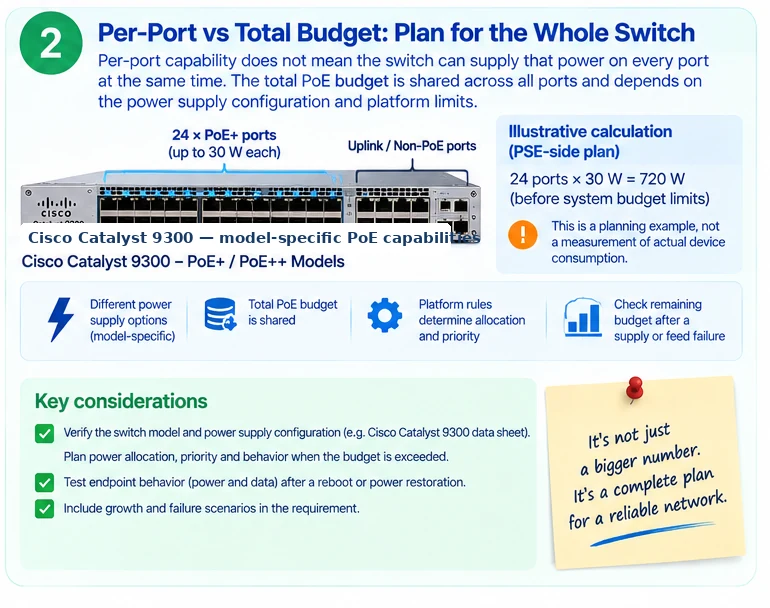
When purchasing a network switch, the total power budget is often more important than the per-port rating. A 48-port switch rated for 30W per port (PoE+) might only have a total budget of 600W or 750W. If you plug in 20 PoE+ APs at 30W each, that requires 600W. If the budget is tight, the switch may power-cycle or stop delivering power to certain ports. Always check the Total Power Budget specification.

Real-World Use Cases and Deployment Scenarios

1. Campus Network Expansion with Wi-Fi 6

Deploying Wi-Fi 6 access points in a large office building requires consistent high power. Older switches using standard PoE cannot support modern APs effectively. A switch with PoE+ capabilities ensures that every access point receives sufficient energy to drive its radios and cooling fans. For this use case, shortlist managed PoE access switches with enough per-port wattage, total power budget, and uplink capacity for the full floor plan.

2. Video Surveillance and CCTV

Security cameras, particularly PTZ (Pan-Tilt-Zoom) models, draw more power for heaters and motors. PoE might suffice for a dome camera, but a PoE++ switch is necessary for a PTZ camera mounted on a high wall or outdoors where battery backup is limited. A switch with high power budgeting ensures that all cameras remain online even if a storm triggers a surge demand.

3. Smart Building Lighting

The Internet of Things (IoT) is transforming office environments. Smart LED fixtures often utilize Type 3 or Type 4 power classes to enable dimming and color changes without a separate DALI bus. By utilizing a PoE++ switch, facility managers can replace legacy wiring and install smart lighting directly into the existing network drops.

Choosing the Right Switch for Your Environment

Selecting the right hardware requires a balance between port count, power class, and management features.

Managed vs. Unmanaged

For a PoE switch in a critical environment like a server room or security system, a managed switch is usually preferred. It allows engineers to prioritize traffic and monitor power consumption per port. Unmanaged switches are suitable for small branch offices or home labs.

Total Wattage Matters

Consider the scenario where you need to deploy 24 VoIP phones. Each phone draws about 7W on average. Even with a 15W budget, you have headroom. However, if you are deploying 48 access points, each at 24W, you need a switch with a minimum total budget of 1.2kW or a Power Over Ethernet Midspan in parallel.

Safety and Standards Compliance

Always ensure that the Power over Ethernet equipment is compliant with safety regulations (UL, CE, FCC). Non-compliant equipment can cause overheating or electrical fires. SwitchInfra partners typically ensure their hardware meets global safety standards, providing reliability for enterprise deployments.

Summary

Understanding the distinctions between PoE, PoE+, and PoE++ is vital for network infrastructure planning. Whether you are deploying VoIP phones, high-definition security cameras, or smart lighting systems, the power class determines the longevity and performance of your equipment. A higher standard switch offers more flexibility and future-proofing for your investment. By analyzing the total power budget and the specific needs of your endpoints, you can avoid costly upgrades and downtime.

Recommended Product Categories

For procurement planning, compare products by power class, total PoE budget, uplink bandwidth, management feature set, and deployment environment.

  • Managed PoE+ Access Switches: A practical fit for offices, schools, and retail branches with Wi-Fi APs, VoIP phones, and standard security cameras.
  • PoE++ Access Switches: Better suited for PTZ cameras, smart lighting, high-power APs, and industrial endpoints that require 60W or higher power classes.
  • Industrial PoE Switches: Useful for harsh environments where extended temperature support, DIN-rail mounting, redundant power, and surge protection matter.
  • PoE Injectors and Midspans: Helpful when only a few endpoints need power and replacing the entire switch is not justified.