
ConnectX and BlueField Selection: Host Fit, Protocol and Offload Requirements
Select ConnectX adapters or BlueField DPUs by exact variant, host integration, protocol support, software stack and operational ownership.
Start from the function, then qualify the host
| Required outcome | Questions for the product owner | Inputs for the technical reviewer |
|---|---|---|
| General network connectivity | Which protocol, number of ports and useful application throughput? | Exact server, slot or OCP bay, operating system, peer port and available cooling |
| RDMA / accelerated communication | Which application and communication stack? What workload will demonstrate success? | Adapter variant, firmware/driver combination, CPU/GPU placement and fabric configuration |
| Infrastructure offload with a DPU | Which function moves to the DPU, and who operates it? | Required software, management access, image lifecycle, recovery owner and host integration |
Use the NIC / SuperNIC / DPU article for the role distinction. Use this page for host qualification; a family name alone is not an exact product selection.
Collect a useful host record
Download the host checklist · Read the product-manager brief
Record the server model and riser or OCP bay; slot generation and usable width; bracket, power and airflow; CPU/GPU locality; operating system; driver and firmware versions; required protocol and offloads; peer switch and its port; module or cable OPN; quantity if known; and the document revision used for each support decision. PCIe cards and OCP modules require different physical host interfaces. Keep Ethernet and VPI variants separate when identifying candidates. See the ConnectX-7 hardware manual for the specific card variant.
Example: an incomplete request that can still move forward
“Existing GPU server; two network ports required; exact slot/riser and peer optics not yet supplied.” The first action is to obtain the server configuration and peer port, with the project engineer as the proposed owner. The product owner records the intended workload and needed offload. Purchasing retains the original requested model, if any, and asks for the exact candidate OPN after those inputs are reviewed. No replacement model or quantity is silently invented.
Once the host candidate is known, continue with the optics and cable checklist. Share the host record or original BOM to start the review. The detailed six-step method below covers software and acceptance evidence.
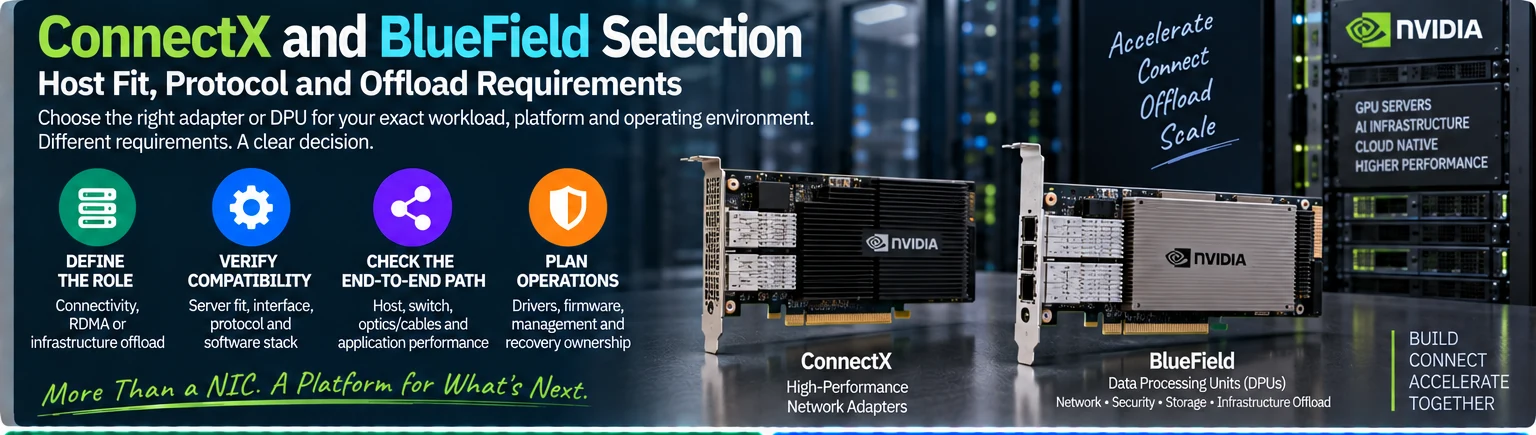
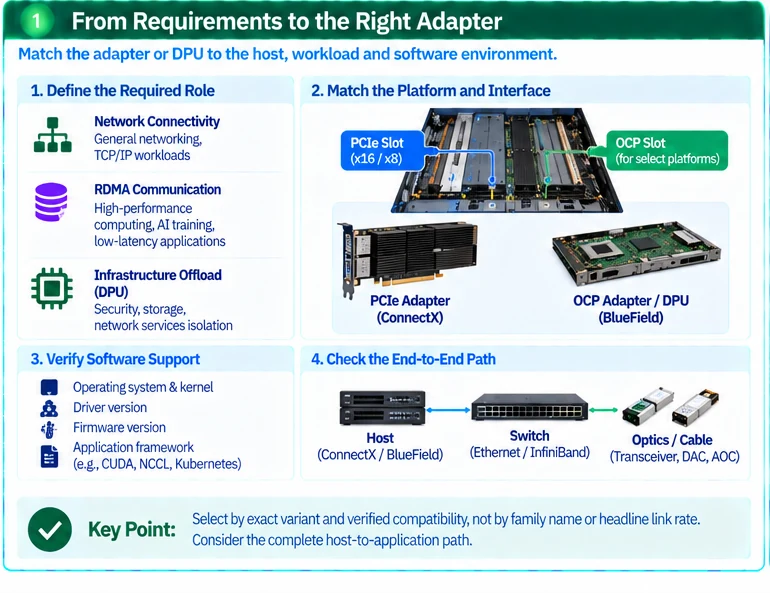
Choose a network adapter from the role it must perform in the host. Basic connectivity, accelerated communication and infrastructure offload are different requirements. A family name or headline link rate does not establish protocol support, physical fit or the software needed to use a device.
1. Define the required role
State whether the host needs ordinary network access, an RDMA communication path, or a separately managed infrastructure-processing function. Identify the application framework and operating environment.
A DPU should be selected because its processing and isolation model supports a defined requirement, not because its product category sounds more capable. Include the team responsible for its software lifecycle and recovery.
2. Identify the exact adapter and server
Record the complete adapter part number, server model and relevant hardware configuration. Confirm physical form factor, supported host interface, mechanical clearance, power and cooling requirements. PCIe add-in and OCP implementations should not be treated as interchangeable packages.
ConnectX documentation distinguishes adapter variants and their requirements. Protocol and rate support must be checked for the offered identifier rather than inferred from the family name. R51
| Selection dimension | Evidence required |
|---|---|
| Physical integration | Supported server slot or form factor and mechanical fit |
| Host attachment | Supported PCIe arrangement and relevant topology constraints |
| Network interface | Protocol, logical ports, rate and qualified media |
| Software | Operating system, driver, firmware and application dependencies |
| Offload function | Feature actually required and its supported deployment mode |
| Operations | Update, monitoring, access and recovery ownership |
3. Check the host-to-application path
A network port’s nominal rate does not prove that the host can supply equivalent useful traffic. Consider the actual host interface, CPU or GPU locality, application behavior and software configuration. Do not translate an adapter’s port specification directly into a workload-performance promise.
For a GPU server, record which adapter is associated with which host or GPU path under the platform design. Test the intended placement rather than assuming all slots are operationally equivalent.
4. Qualify the peer and interconnect
Identify the switch port and its operating mode, then select the supported module or assembly at both ends. NVIDIA’s platform-linking guidance illustrates how the host, switch and interconnect choices form one configuration. R05
Ethernet-only and VPI or InfiniBand-capable variants must not be conflated. An adapter linked from an InfiniBand solution page still requires its own protocol-support evidence.
5. Freeze the software baseline
Record the driver and firmware combination, operating system and any container, orchestration or acceleration dependencies. Versioned platform-support documents apply to their stated environment; do not treat one release’s support table as a permanent guarantee. R10
For a DPU, include its management access, image lifecycle and restoration procedure. An unowned secondary operating environment can become a maintenance gap.
6. Accept the required function
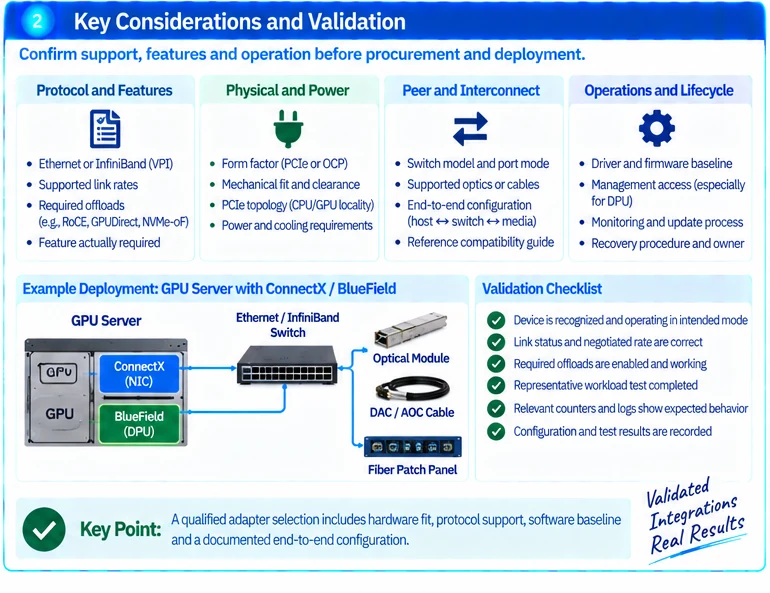
Verify device recognition, link mode, relevant offloads and representative workload behavior. Retain the test conditions and host placement. Test recovery only within an approved scope.
The output is a host-specific adapter qualification, not a generic ranking of NICs, SuperNICs and DPUs. Supply the server configuration, application, protocol and offload requirement when requesting a candidate device.
Engineering illustrations
These figures illustrate the design concepts discussed here. They are not measured results, certified configurations or a supplied-equipment list.
Related reading
- NIC, SuperNIC or DPU: Choose the Function, Not the Acronym
- AI Ethernet Fabric Design: From GPU Traffic to a Qualified BOM
References
Practical project worksheets
Download only what helps your task. You can send your existing list now and add missing details later. Worksheets are in English.
Adapter and DPU host checklist
Host model, PCIe slot, OS, driver, firmware, protocol and intended workload.
Download the worksheetDiscuss the existing requirements →