
NVIDIA ConnectX Bracket Selection: Low Profile, Tall and OCP 3.0
Identify 14 MTM bracket part numbers by PCIe or OCP mounting, port cutout, LED position and evidence needed for a replacement order.
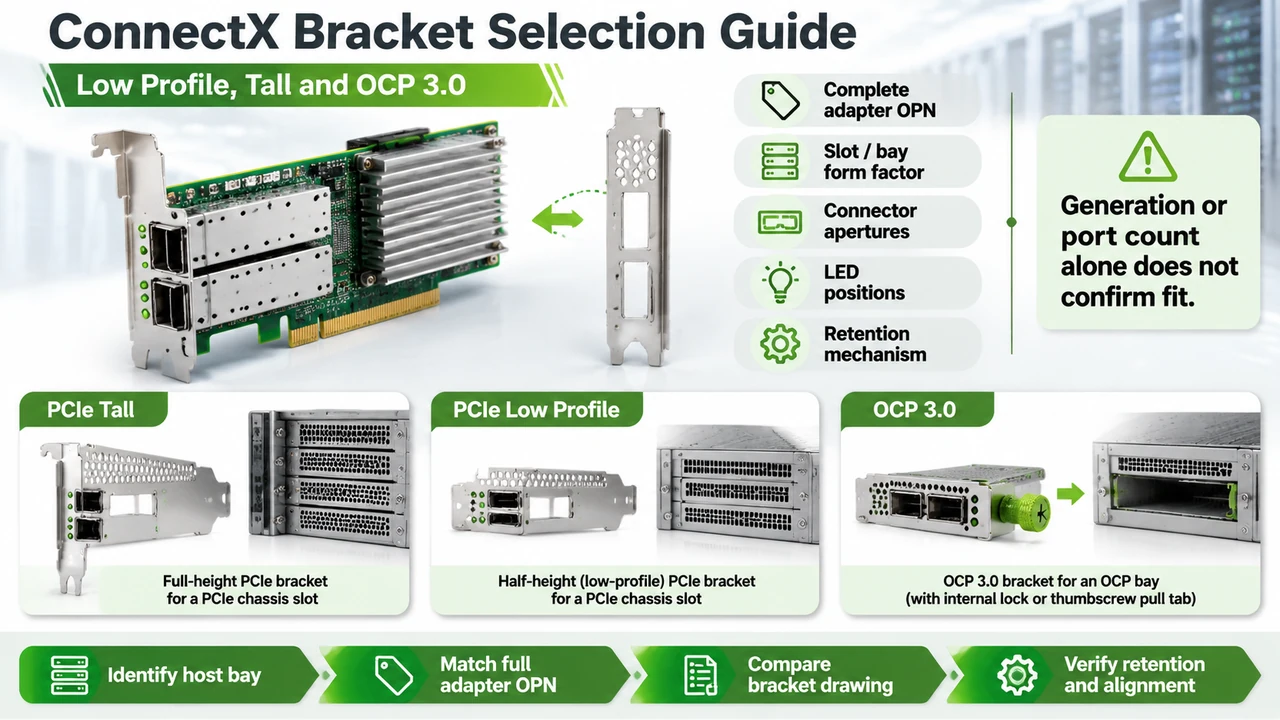
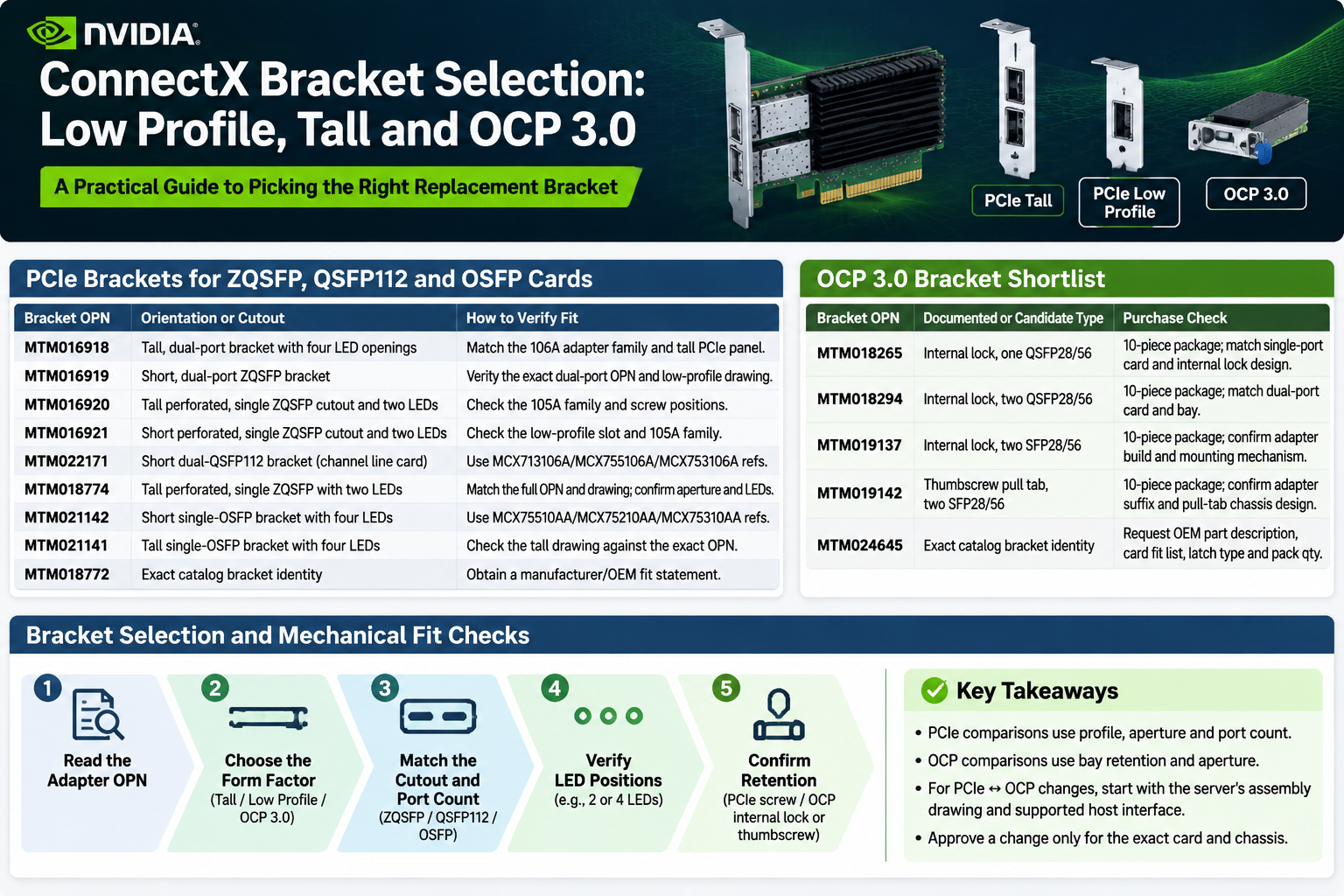
Order a ConnectX replacement bracket using the complete adapter OPN, host slot form factor, connector apertures, LED positions and mechanical retention. PCIe tall and low-profile brackets mate to a PCIe chassis opening. Open Compute Project (OCP) 3.0 brackets need the server’s approved retention mechanism, such as internal lock or thumbscrew pull tab. Start with a label photo and the correct adapter and server drawings. NVIDIA ConnectX-6 installation guide · NVIDIA ConnectX-7 OCP 3.0 adapter manual
Identify the adapter and server slot before choosing the PCIe bracket or OCP 3.0 retention hardware. View full-size cover image.
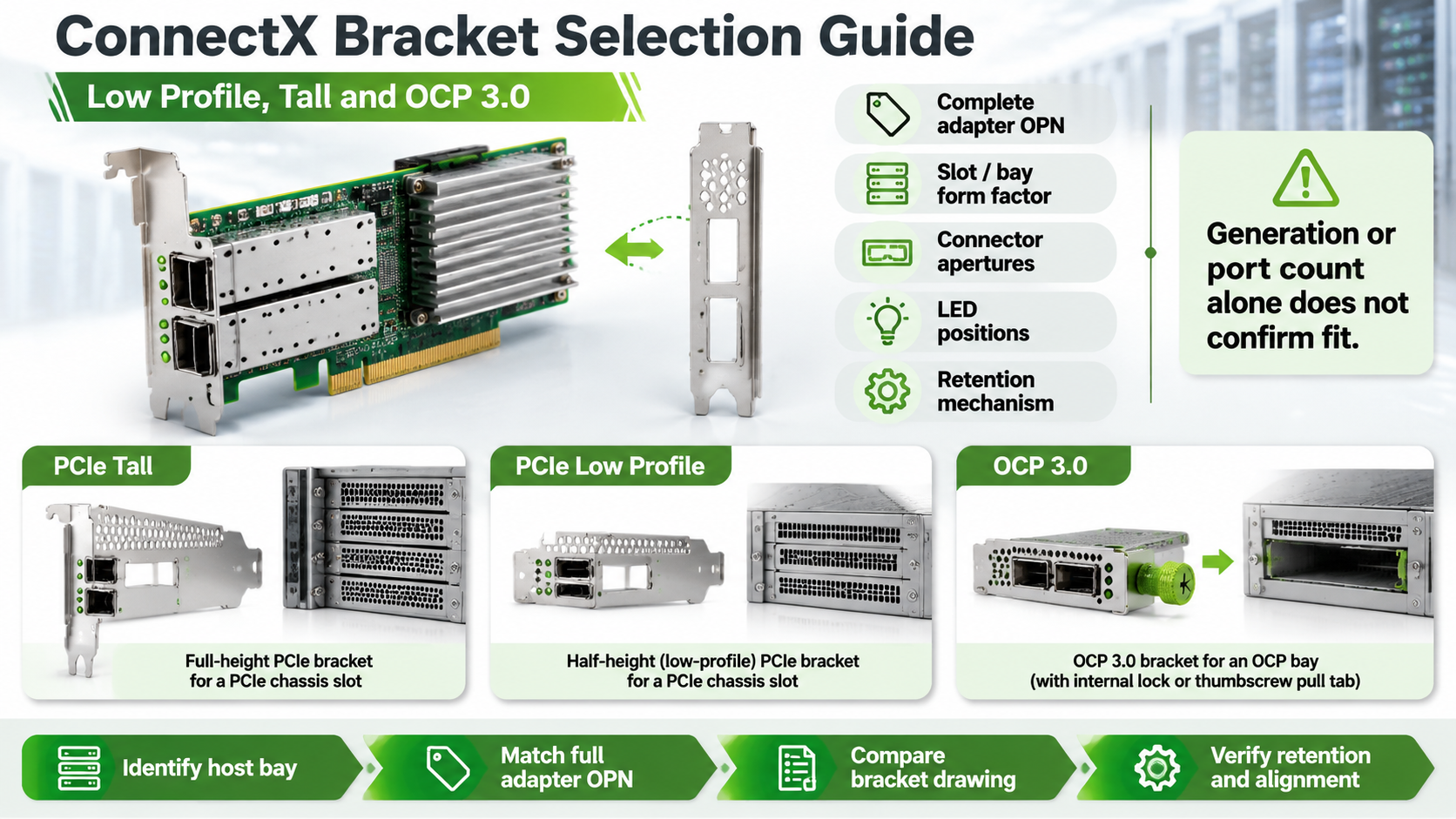
PCIe brackets for ZQSFP, QSFP112 and OSFP cards
The documented families below are selection references. NVIDIA’s published part descriptions cover the MTM0169xx rows. PNY’s networking line card provides channel references for the noted MTM022171, MTM018774 and MTM02114x variants. Check the complete order suffix, adapter drawing and chassis revision before buying. NVIDIA networking part descriptions · PNY networking line card, adapter brackets, p. 24
| Bracket OPN | Orientation or cutout | How to verify fit |
|---|---|---|
| MTM016918 | Tall, dual-port bracket with four LED openings listed | Match the specific 106A adapter family in the part listing and the tall PCIe panel. |
| MTM016919 | Short, dual-port ZQSFP bracket | Verify the exact dual-port adapter OPN and use the low-profile drawing. NVIDIA’s short part listing includes additional card references. |
| MTM016920 | Tall perforated bracket, single ZQSFP cutout and two LEDs | Check the quoted 105A family and screw positions. |
| MTM016921 | Short perforated bracket, single ZQSFP cutout and two LEDs | Check the low-profile slot and the specific 105A family listed for this item. |
| MTM022171 | Short dual-QSFP112 bracket in the channel line card | Start with the line card’s MCX713106A, MCX755106A or MCX753106A references, then confirm full model and revision. |
| MTM018774 | Tall perforated single ZQSFP bracket with two LEDs in the channel line card | Match the full adapter OPN and drawing. Confirm aperture and LED positions before substituting from the MTM016920 family. |
| MTM021142 | Short single-OSFP bracket with four LED openings in the channel line card | Start with MCX75510AA, MCX75210AA or MCX75310AA as family references and confirm the adapter and slot. |
| MTM021141 | Tall single-OSFP bracket with four LED openings in the channel line card | Check the full tall-bracket drawing against the exact OPN and rear panel. |
| MTM018772 | Exact catalog bracket identity | Obtain a manufacturer or OEM fit statement for the complete PCIe card OPN, profile, connector and LED layout. |
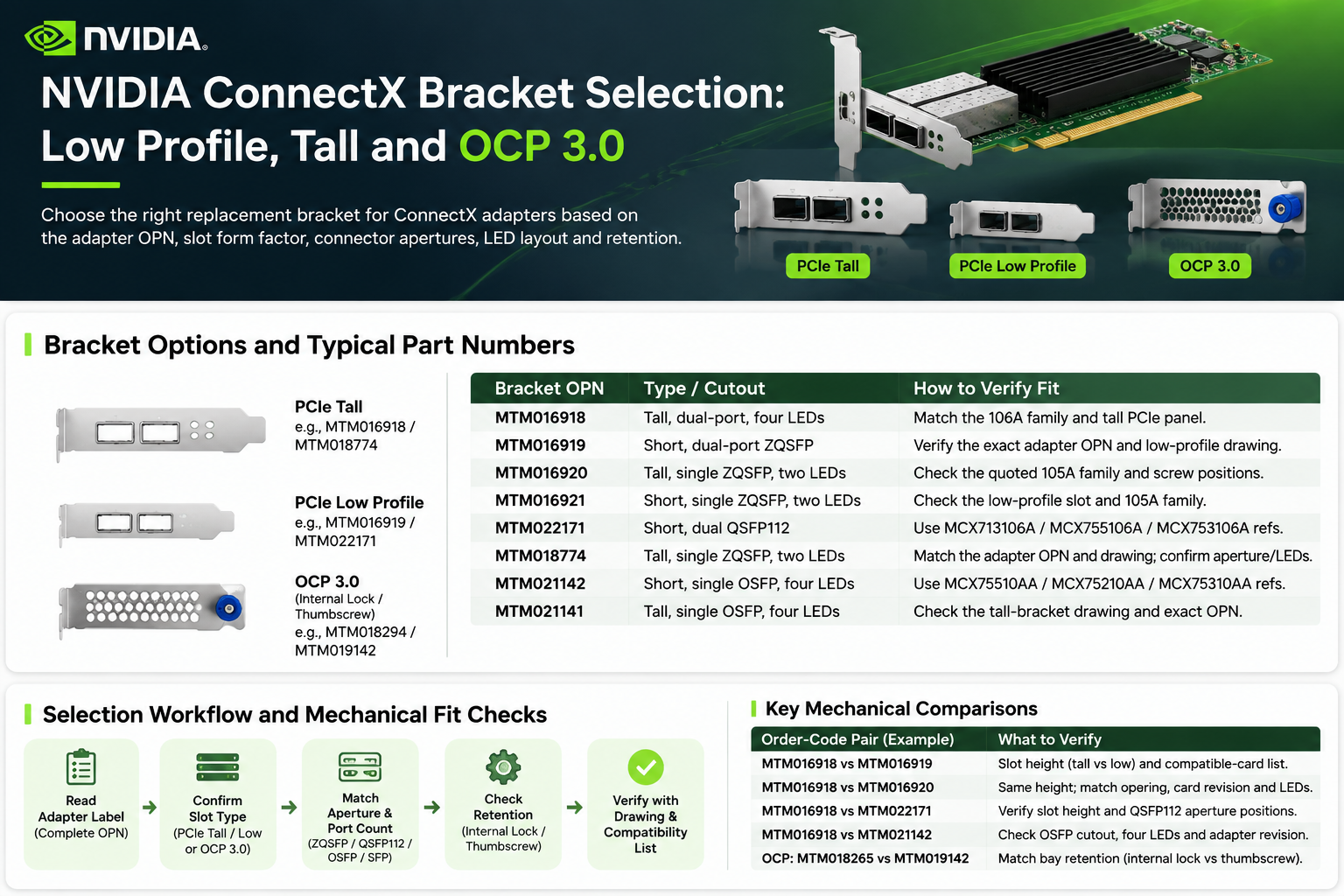
Match the adapter part number, connector opening and server chassis before ordering the bracket.
OCP 3.0 bracket shortlist
Check whether the OCP bay accepts internal lock or an externally handled retention design. The port count alone leaves the latch and chassis interface unresolved. NVIDIA’s published part descriptions include these examples. NVIDIA networking part descriptions · NVIDIA ConnectX-7 OCP manual and bracket variants
| Bracket OPN | Documented or candidate type | Purchase check |
|---|---|---|
| MTM018265 | Internal lock, one QSFP28/56 opening | NVIDIA lists a 10-piece package. Match the single-port card family and the host’s internal lock design. |
| MTM018294 | Internal lock, two QSFP28/56 openings | NVIDIA lists a 10-piece package. Match the exact dual-port card and the bay. |
| MTM019137 | Internal lock, two SFP28/56 openings | NVIDIA lists a 10-piece package. Confirm the adapter build and mounting mechanism. |
| MTM019142 | Thumbscrew pull tab, two SFP28/56 openings | NVIDIA lists a 10-piece package. Confirm the exact adapter suffix and pull-tab chassis design. |
| MTM024645 | Exact catalog bracket identity | Request the order-specific OEM part description, card fit list, latch type and pack quantity before specifying it. |
For MTM018772 and MTM024645, the SwitchInfra order records identify the items. Obtain the manufacturer fit list or drawing for a configuration-specific substitution. SwitchInfra MTM018772 · SwitchInfra MTM024645
Pairwise mechanical fit checks
The PCIe comparisons use profile, aperture and port count. The OCP comparisons use bay retention and aperture. For a change between PCIe and OCP, start with the server’s assembly drawing and supported host interface. Approve a change only for the exact card and chassis. PNY entries provide channel references, and rows marked pending require part-specific OEM evidence. NVIDIA part descriptions · PNY adapter brackets, p. 24 · NVIDIA OCP hardware guide
PCIe bracket pairs
| Order-code pair | First part | Second part | What to verify |
|---|---|---|---|
| MTM016918 vs MTM016919 | Tall dual-port, four-LED bracket | Low-profile dual-port ZQSFP bracket | Match the tall or low-profile opening, then check the vendor’s exact compatible-card list for the selected bracket. |
| MTM016918 vs MTM016920 | Tall dual-port, four-LED bracket | Tall single-port perforated ZQSFP bracket | The slot height is shared. Match the opening and card revision. Compare the card’s listed 105A family and two LED locations. |
| MTM016918 vs MTM016921 | Tall dual-port, four-LED bracket | Low-profile single-port perforated ZQSFP bracket | Select by both PCIe slot height and cutout geometry. Check the low-profile drawing for the exact 105A family. |
| MTM016918 vs MTM022171 | Tall dual-port, four-LED bracket | Channel-listed low-profile dual QSFP112 bracket | Select by both PCIe slot height and cutout geometry. Confirm the complete card code and QSFP112 aperture positions. |
| MTM016918 vs MTM018774 | Tall dual-port, four-LED bracket | Channel-listed tall single-port perforated ZQSFP bracket | The slot height is shared. Match the opening and card revision. Match the supported adapter in the channel line card against the OEM drawing. |
| MTM016918 vs MTM021142 | Tall dual-port, four-LED bracket | Channel-listed low-profile single OSFP bracket | Select by both PCIe slot height and cutout geometry. Compare the OSFP cutout, four LED openings and adapter revision. |
| MTM016918 vs MTM021141 | Tall dual-port, four-LED bracket | Channel-listed tall single OSFP bracket | The slot height is shared. Match the opening and card revision. Confirm the full card suffix, tall opening and four LED locations. |
| MTM016918 vs MTM018772 | Tall dual-port, four-LED bracket | Catalog bracket with fit pending | Use the known fit for MTM016918. Hold MTM018772 for an exact drawing. Obtain the manufacturer’s profile, aperture, LED and screw-position drawing. |
| MTM016919 vs MTM016920 | Low-profile dual-port ZQSFP bracket | Tall single-port perforated ZQSFP bracket | Select by both PCIe slot height and cutout geometry. Compare the card’s listed 105A family and two LED locations. |
| MTM016919 vs MTM016921 | Low-profile dual-port ZQSFP bracket | Low-profile single-port perforated ZQSFP bracket | The slot height is shared. Match the opening and card revision. Check the low-profile drawing for the exact 105A family. |
| MTM016919 vs MTM022171 | Low-profile dual-port ZQSFP bracket | Channel-listed low-profile dual QSFP112 bracket | The slot height is shared. Match the opening and card revision. Confirm the complete card code and QSFP112 aperture positions. |
| MTM016919 vs MTM018774 | Low-profile dual-port ZQSFP bracket | Channel-listed tall single-port perforated ZQSFP bracket | Select by both PCIe slot height and cutout geometry. Match the supported adapter in the channel line card against the OEM drawing. |
| MTM016919 vs MTM021142 | Low-profile dual-port ZQSFP bracket | Channel-listed low-profile single OSFP bracket | The slot height is shared. Match the opening and card revision. Compare the OSFP cutout, four LED openings and adapter revision. |
| MTM016919 vs MTM021141 | Low-profile dual-port ZQSFP bracket | Channel-listed tall single OSFP bracket | Select by both PCIe slot height and cutout geometry. Confirm the full card suffix, tall opening and four LED locations. |
| MTM016919 vs MTM018772 | Low-profile dual-port ZQSFP bracket | Catalog bracket with fit pending | Use the known fit for MTM016919. Hold MTM018772 for an exact drawing. Obtain the manufacturer’s profile, aperture, LED and screw-position drawing. |
| MTM016920 vs MTM016921 | Tall single-port perforated ZQSFP bracket | Low-profile single-port perforated ZQSFP bracket | Choose the rack server’s actual PCIe profile. Check the low-profile drawing for the exact 105A family. |
| MTM016920 vs MTM022171 | Tall single-port perforated ZQSFP bracket | Channel-listed low-profile dual QSFP112 bracket | Select by both PCIe slot height and cutout geometry. Confirm the complete card code and QSFP112 aperture positions. |
| MTM016920 vs MTM018774 | Tall single-port perforated ZQSFP bracket | Channel-listed tall single-port perforated ZQSFP bracket | Both have a similar tall single-port opening. Match the card family and screw positions against each part’s own source. |
| MTM016920 vs MTM021142 | Tall single-port perforated ZQSFP bracket | Channel-listed low-profile single OSFP bracket | Select by both PCIe slot height and cutout geometry. Compare the OSFP cutout, four LED openings and adapter revision. |
| MTM016920 vs MTM021141 | Tall single-port perforated ZQSFP bracket | Channel-listed tall single OSFP bracket | The slot height is shared. Match the opening and card revision. Confirm the full card suffix, tall opening and four LED locations. |
| MTM016920 vs MTM018772 | Tall single-port perforated ZQSFP bracket | Catalog bracket with fit pending | Use the known fit for MTM016920. Hold MTM018772 for an exact drawing. Obtain the manufacturer’s profile, aperture, LED and screw-position drawing. |
| MTM016921 vs MTM022171 | Low-profile single-port perforated ZQSFP bracket | Channel-listed low-profile dual QSFP112 bracket | The slot height is shared. Match the opening and card revision. Confirm the complete card code and QSFP112 aperture positions. |
| MTM016921 vs MTM018774 | Low-profile single-port perforated ZQSFP bracket | Channel-listed tall single-port perforated ZQSFP bracket | Choose the rack server’s actual PCIe profile. Match the supported adapter in the channel line card against the OEM drawing. |
| MTM016921 vs MTM021142 | Low-profile single-port perforated ZQSFP bracket | Channel-listed low-profile single OSFP bracket | The slot height is shared. Match the opening and card revision. Compare the OSFP cutout, four LED openings and adapter revision. |
| MTM016921 vs MTM021141 | Low-profile single-port perforated ZQSFP bracket | Channel-listed tall single OSFP bracket | Select by both PCIe slot height and cutout geometry. Confirm the full card suffix, tall opening and four LED locations. |
| MTM016921 vs MTM018772 | Low-profile single-port perforated ZQSFP bracket | Catalog bracket with fit pending | Use the known fit for MTM016921. Hold MTM018772 for an exact drawing. Obtain the manufacturer’s profile, aperture, LED and screw-position drawing. |
| MTM022171 vs MTM018774 | Channel-listed low-profile dual QSFP112 bracket | Channel-listed tall single-port perforated ZQSFP bracket | Select by both PCIe slot height and cutout geometry. Match the supported adapter in the channel line card against the OEM drawing. |
| MTM022171 vs MTM021142 | Channel-listed low-profile dual QSFP112 bracket | Channel-listed low-profile single OSFP bracket | The slot height is shared. Match the opening and card revision. Compare the OSFP cutout, four LED openings and adapter revision. |
| MTM022171 vs MTM021141 | Channel-listed low-profile dual QSFP112 bracket | Channel-listed tall single OSFP bracket | Select by both PCIe slot height and cutout geometry. Confirm the full card suffix, tall opening and four LED locations. |
| MTM022171 vs MTM018772 | Channel-listed low-profile dual QSFP112 bracket | Catalog bracket with fit pending | Use the known fit for MTM022171. Hold MTM018772 for an exact drawing. Obtain the manufacturer’s profile, aperture, LED and screw-position drawing. |
| MTM018774 vs MTM021142 | Channel-listed tall single-port perforated ZQSFP bracket | Channel-listed low-profile single OSFP bracket | Select by both PCIe slot height and cutout geometry. Compare the OSFP cutout, four LED openings and adapter revision. |
| MTM018774 vs MTM021141 | Channel-listed tall single-port perforated ZQSFP bracket | Channel-listed tall single OSFP bracket | The slot height is shared. Match the opening and card revision. Confirm the full card suffix, tall opening and four LED locations. |
| MTM018774 vs MTM018772 | Channel-listed tall single-port perforated ZQSFP bracket | Catalog bracket with fit pending | Use the known fit for MTM018774. Hold MTM018772 for an exact drawing. Obtain the manufacturer’s profile, aperture, LED and screw-position drawing. |
| MTM021142 vs MTM021141 | Channel-listed low-profile single OSFP bracket | Channel-listed tall single OSFP bracket | Match the low-profile or tall rear panel. Check the full OSFP card suffix and the four-LED geometry. |
| MTM021142 vs MTM018772 | Channel-listed low-profile single OSFP bracket | Catalog bracket with fit pending | Use the known fit for MTM021142. Hold MTM018772 for an exact drawing. Obtain the manufacturer’s profile, aperture, LED and screw-position drawing. |
| MTM021141 vs MTM018772 | Channel-listed tall single OSFP bracket | Catalog bracket with fit pending | Use the known fit for MTM021141. Hold MTM018772 for an exact drawing. Obtain the manufacturer’s profile, aperture, LED and screw-position drawing. |
OCP 3.0 bracket pairs
| Order-code pair | First part | Second part | What to verify |
|---|---|---|---|
| MTM018265 vs MTM018294 | Internal lock, one QSFP28/56 aperture | Internal lock, two QSFP28/56 apertures | The retention type is shared. Match the opening and card revision. Match the exact dual-port card and bay retention. |
| MTM018265 vs MTM019137 | Internal lock, one QSFP28/56 aperture | Internal lock, two SFP28/56 apertures | The retention type is shared. Match the opening and card revision. Check the host’s internal latch and exact card suffix. |
| MTM018265 vs MTM019142 | Internal lock, one QSFP28/56 aperture | Thumbscrew pull tab, two SFP28/56 apertures | Select by both port layout and bay retention. Check the external pull-tab opening and the full adapter revision. |
| MTM018265 vs MTM024645 | Internal lock, one QSFP28/56 aperture | Catalog bracket with fit pending | Use the known fit for MTM018265. Hold MTM024645 for an exact drawing. Obtain the manufacturer’s card reference, aperture dimensions, latch and pack count. |
| MTM018294 vs MTM019137 | Internal lock, two QSFP28/56 apertures | Internal lock, two SFP28/56 apertures | The retention type is shared. Match the opening and card revision. Check the host’s internal latch and exact card suffix. |
| MTM018294 vs MTM019142 | Internal lock, two QSFP28/56 apertures | Thumbscrew pull tab, two SFP28/56 apertures | Select by both port layout and bay retention. Check the external pull-tab opening and the full adapter revision. |
| MTM018294 vs MTM024645 | Internal lock, two QSFP28/56 apertures | Catalog bracket with fit pending | Use the known fit for MTM018294. Hold MTM024645 for an exact drawing. Obtain the manufacturer’s card reference, aperture dimensions, latch and pack count. |
| MTM019137 vs MTM019142 | Internal lock, two SFP28/56 apertures | Thumbscrew pull tab, two SFP28/56 apertures | The SFP aperture count is shared. Choose the retention supported by the host and match the precise card suffix for that part. |
| MTM019137 vs MTM024645 | Internal lock, two SFP28/56 apertures | Catalog bracket with fit pending | Use the known fit for MTM019137. Hold MTM024645 for an exact drawing. Obtain the manufacturer’s card reference, aperture dimensions, latch and pack count. |
| MTM019142 vs MTM024645 | Thumbscrew pull tab, two SFP28/56 apertures | Catalog bracket with fit pending | Use the known fit for MTM019142. Hold MTM024645 for an exact drawing. Obtain the manufacturer’s card reference, aperture dimensions, latch and pack count. |
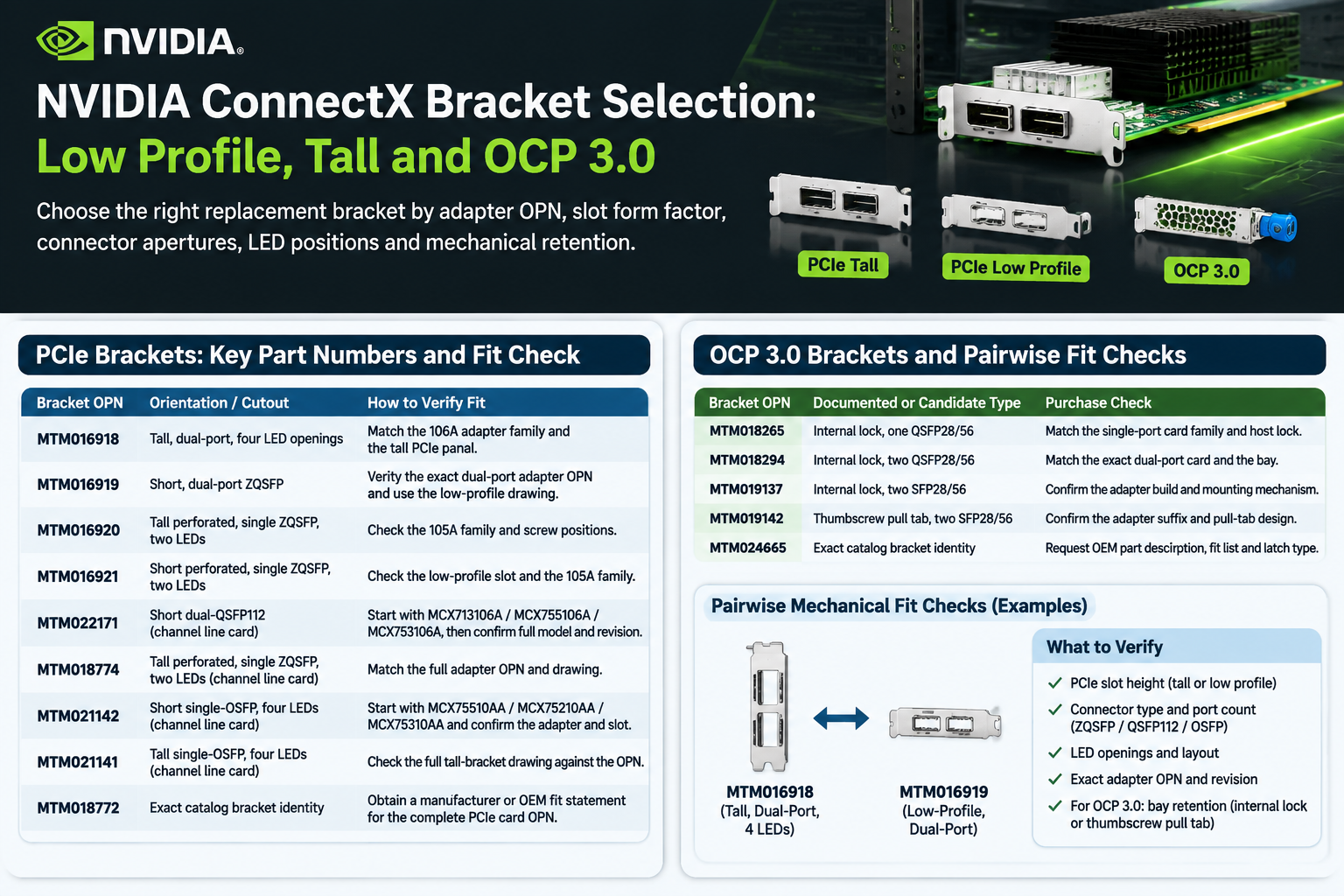
The examples compare connector openings, retention features and server fit checks.
Documented application: fitting a ConnectX adapter to a server bay
NVIDIA’s ConnectX-6 PCIe installation instructions cover fitting a low-profile bracket where the chassis requires it. The ConnectX-7 Open Compute Project (OCP) 3.0 installation guide documents different internal-lock, thumbscrew pull-tab and ejector-latch mounting systems. In a server refresh, start by identifying the bay. Then match the adapter’s complete ordering part number (OPN), the faceplate connector layout and the allowed retention mechanism. NVIDIA ConnectX-6 PCIe hardware installation · NVIDIA ConnectX-7 OCP 3.0 installation and bracket types
For an inventory example, compare MTM016920 and MTM016921 when the installed card is in the documented single-port ZQSFP family. The slot height determines which drawing to check. At an OCP station, MTM019137 and MTM019142 both have two SFP28/56 apertures, so the retention type and complete adapter revision decide the selection. Record each approval under the full OPN. NVIDIA adapter accessory part descriptions
Follow the installation sequence to verify slot fit, bracket retention and cable clearance.
Replacement decision and verification
Replacement decision. Approve a PCIe bracket only after the exact adapter and server drawing match its height, screw positions, connector apertures and LEDs. For OCP 3.0, confirm the bay retention as well. A part with pending fit evidence such as MTM018772 or MTM024645 needs its own drawing or manufacturer fit statement before substitution. NVIDIA ConnectX-6 PCIe installation · NVIDIA ConnectX-7 OCP bracket installation
Fit verification. With the server in its approved service state, verify the latch or fasteners, port and LED alignment, and connector clearance. After reassembly, confirm the adapter is detected and the intended cables can be seated and serviced on that bay.
Buying guide for the correct bracket
Include the card’s full OPN and revision, server model and slot or riser, a rear-panel image with card ports and LEDs, the current bracket part number, and the required quantity. For OCP 3.0, include the physical bay size and retention mechanism. Distinguish a pack of ten from an individual bracket in the requisition. This information lets the seller confirm mechanical fit without relying on the ConnectX generation or advertised network rate alone. SwitchInfra adapter accessories
Frequently asked questions
Does the ConnectX generation identify the right low-profile bracket?
Start with the complete ordering part number and its mechanical drawing. For the same generation, available cards can have different connectors, heights or LED positions. Compare the actual rear opening and screw locations against the offered part. NVIDIA ConnectX-6 PCIe installation
How do I decide between an OCP internal-lock bracket and a pull tab?
Check how the server bay secures and releases the card. Confirm the exact adapter, chassis bay, retention type and aperture using the host and adapter documentation. State the pack quantity separately. NVIDIA ConnectX-7 OCP installation and retention choices
Acronyms and terms
- PCIe means Peripheral Component Interconnect Express.
- OCP means Open Compute Project. OCP 3.0 refers to a server adapter specification with its own bay and retention choices.
- OPN means ordering part number. FRU means field-replaceable unit. LED means light-emitting diode.
- OSFP means Octal Small Form Factor Pluggable. QSFP means Quad Small Form Factor Pluggable. Match the exact physical cutout in the drawing.
References and related reading
Practical project worksheets
Download only what helps your task. You can send your existing list now and add missing details later. Worksheets are in English.
Adapter and DPU host checklist
Host model, PCIe slot, OS, driver, firmware, protocol and intended workload.
Download the worksheetDiscuss the existing requirements →