
NVIDIA MTEF Fan and Power Supply Compatibility: C, L and M FRUs
Match eight NVIDIA Mellanox MTEF fan and AC PSU part numbers to chassis-specific replacement tables, airflow and current numeric SKUs.
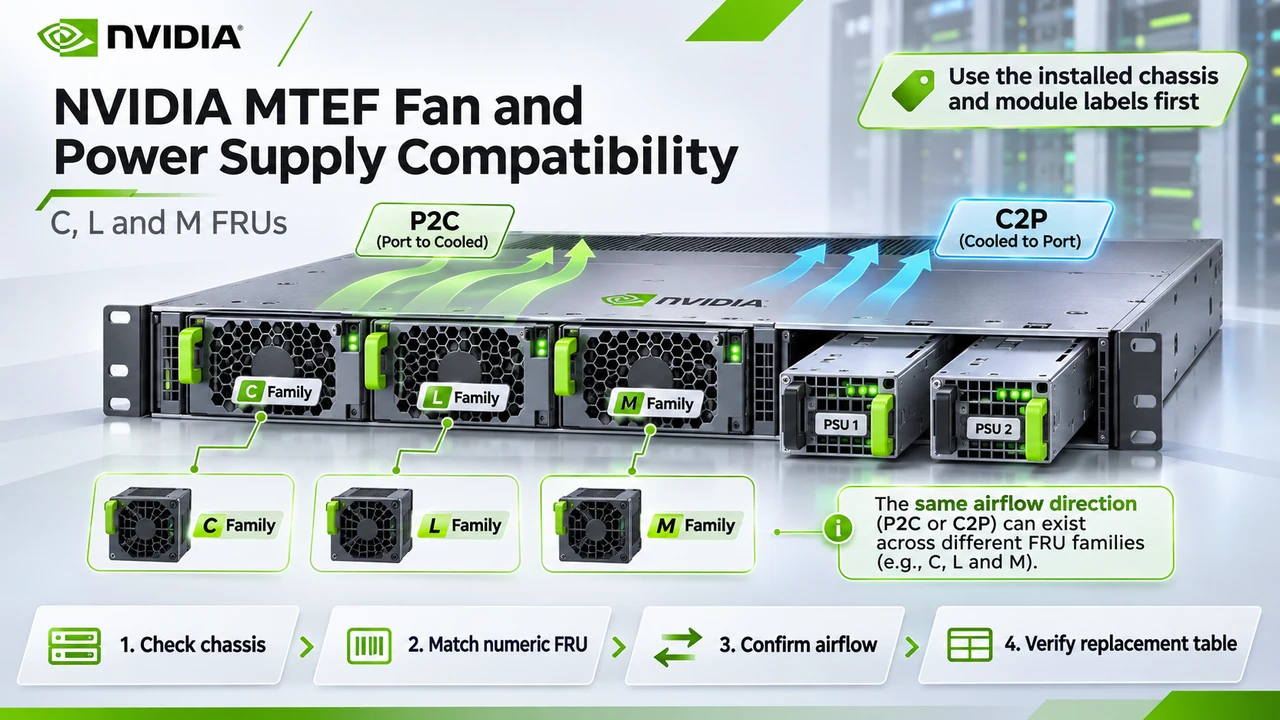
Match an MTEF replacement fan or power supply to the switch model, numeric field-replaceable unit (FRU) code and airflow in the switch’s hardware manual. The -C fans are documented for selected HDR and Spectrum-2 switches, -L fans for QM97XX, and -M fans for SN4700/SN4700D. The same P2C or C2P direction appears across different FRU families. Start with the installed chassis and module labels. NVIDIA QM87XX replacement parts · QM97XX replacement parts · SN4000 replacement parts
Verify the chassis and exact field-replaceable unit before checking airflow and fit. View full-size cover image.
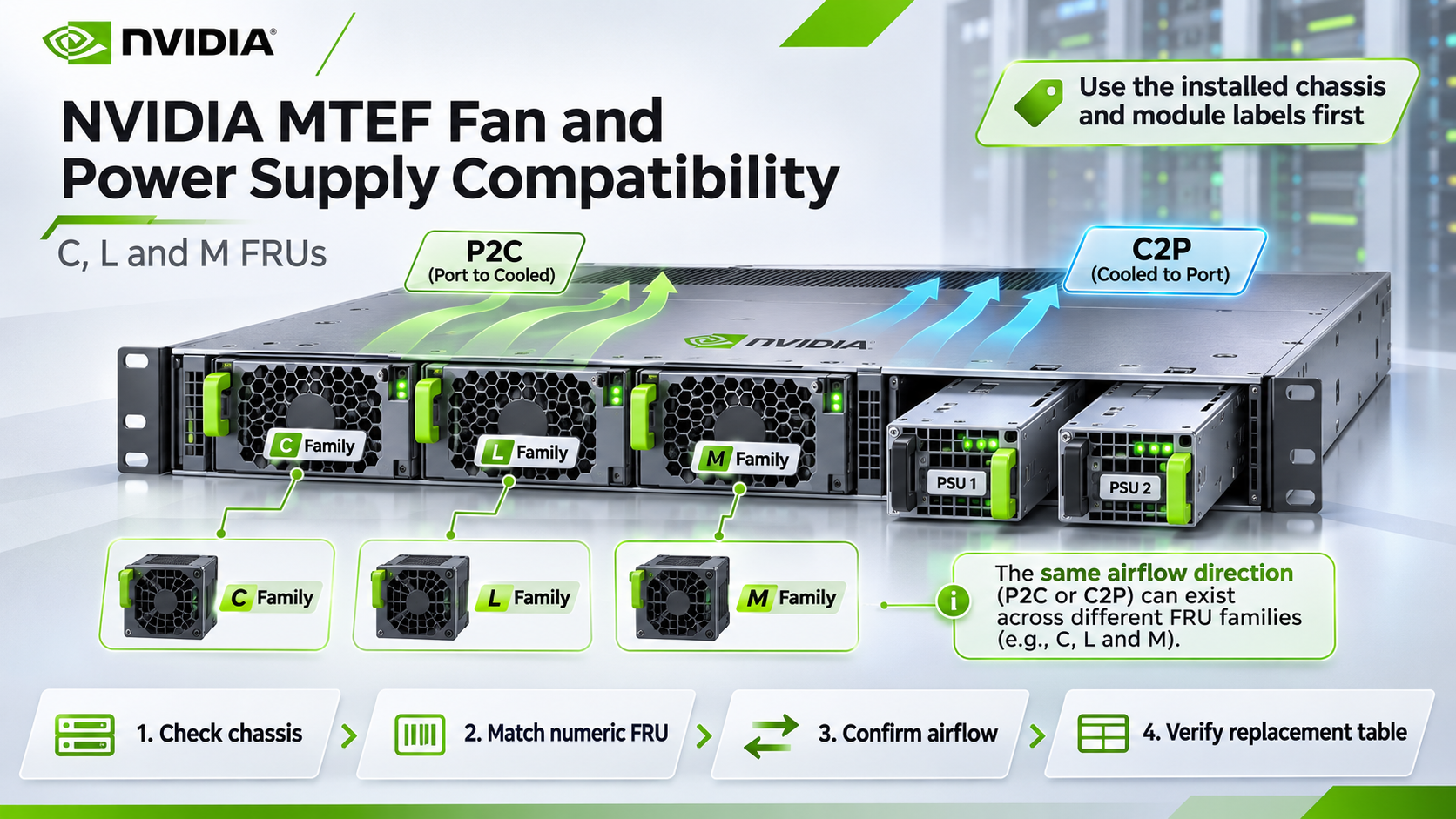
Fan replacements by exact part number
P2C means power-to-connector airflow and C2P means connector-to-power airflow. Confirm the direction from the installed chassis and FRU labels. The scopes below come from chassis-specific manufacturer tables. NVIDIA QM87XX · TQ8X00 MetroX-2 · SN3000 · QM97XX · SN4000
| Legacy fan OPN | NVIDIA numeric FRU | Airflow | Documented replacement family |
|---|---|---|---|
| MTEF-FANF-C | 930-9BFAN-00IN-000 | P2C | QM87XX and TQ8X00 manuals, plus SN3420 and SN3700/SN3700C in the SN3000 manual |
| MTEF-FANR-C | 930-9BFAN-00J0-000 | C2P | Same scope as the -C P2C fan, with reverse airflow |
| MTEF-FANF-L | 930-9BFAN-00IW-000 | P2C | QM97XX manual |
| MTEF-FANR-L | 930-9BFAN-00JA-000 | C2P | QM97XX manual |
| MTEF-FANF-M | 930-9BFAN-00IX-000 | P2C | SN4700/SN4700D |
| MTEF-FANR-M | 930-9BFAN-00JB-000 | C2P | SN4700/SN4700D |
Which replacement fan fits an SN4700?
The current SN4000 accessory table names MTEF-FANF-M for P2C and MTEF-FANR-M for C2P on SN4700 and SN4700D. NVIDIA’s broader part descriptions also mention SN4700 in entries for the -C family. When support lists differ, use the model-specific FRU table and the installed module revision, then confirm any substitution through the OEM or the responsible support channel. SN4600 has a separate fan family listed in that same chassis manual. NVIDIA SN4000 accessory and replacement table · NVIDIA networking part descriptions
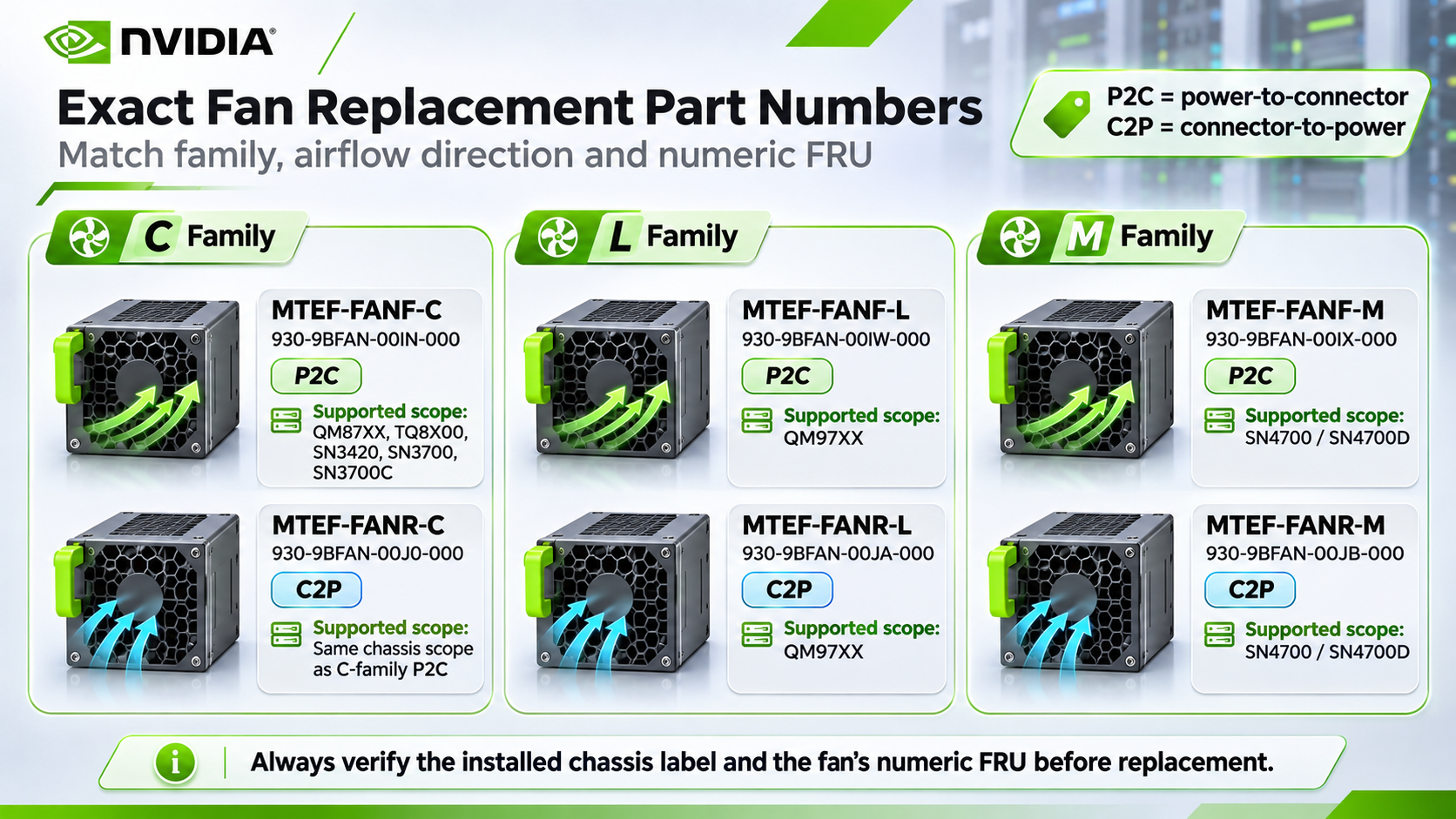
Use the chassis and P2C or C2P airflow designation to select the matching fan part number.
MTEF-PSF-AC-C vs MTEF-PSR-AC-C
| Legacy PSU OPN | NVIDIA numeric FRU | Power and airflow |
|---|---|---|
| MTEF-PSF-AC-C | 930-9BPSU-00JZ-000 | 1100W AC, P2C in the applicable NVIDIA manuals |
| MTEF-PSR-AC-C | 930-9BPSU-00JG-000 | 1100W AC, C2P in the applicable NVIDIA manuals |
The NVIDIA HDR and MetroX-2 hardware manuals list this PSU pair. The SN3000 replacement table lists the pair for SN3700/SN3700C, and the SN4000 table lists the same numeric FRUs for SN4600C. For SN4600 the SN4000 table lists different 1500W parts. The QM97XX AC table also lists different PSU codes. For OEM-branded hardware use the OEM service identifier, nameplate and support table. HPE’s own cross-reference describes P10613-001 with a different wattage from NVIDIA’s stand-alone MTEF-PSF-AC-C description. NVIDIA QM87XX FRUs · NVIDIA SN3000 FRUs · NVIDIA SN4000 FRUs · HPE and NVIDIA OEM reference
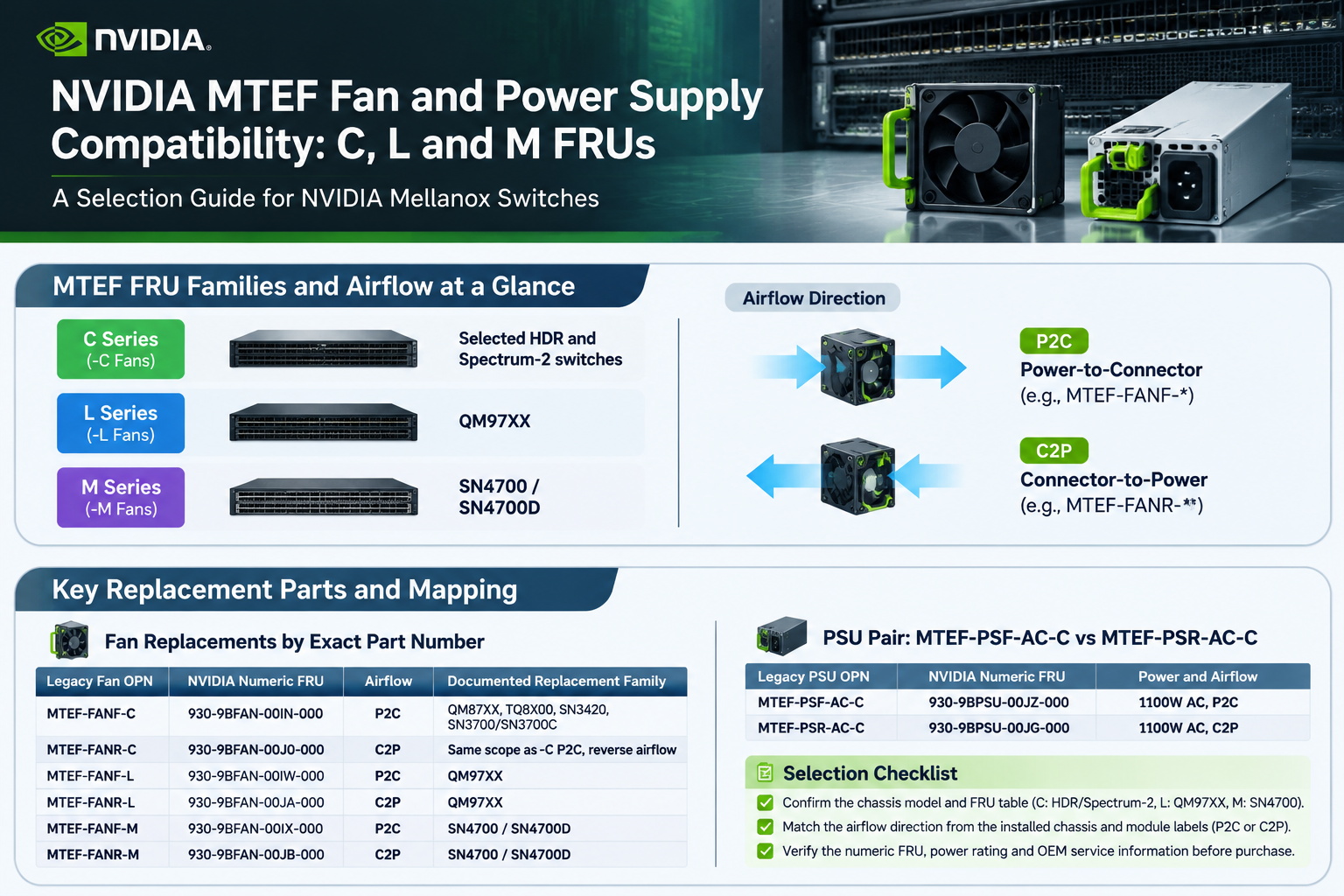
Compare the fan families and AC power supply part numbers against the chassis and airflow requirements.
Pairwise fan and PSU replacement decisions
Read the chassis-specific field-replaceable unit (FRU) table before using either member of a pair. In the tables, C-series scope means the supported HDR, MetroX-2 or Spectrum-2 installations cited above. L-series scope follows the QM97XX manual. M-series scope follows the SN4700/SN4700D table. NVIDIA QM87XX FRU table · SN3000 FRU table · QM97XX FRU table · SN4000 FRU table
| Exact fan pair | What to check before replacing the module |
|---|---|
| MTEF-FANF-C vs MTEF-FANR-C | Same C family with opposite airflow. Use the chassis label and match the P2C or C2P direction for that slot. |
| MTEF-FANF-L vs MTEF-FANR-L | Same QM97XX replacement family with opposite airflow. Match the installed label before returning the chassis to service. |
| MTEF-FANF-M vs MTEF-FANR-M | Same SN4700/SN4700D family with opposite airflow. Match the rack intake and the installed directional part number. |
| MTEF-FANF-C vs MTEF-FANF-L | P2C is shared. Separate C-family chassis stock from QM97XX stock and check the numeric FRU. |
| MTEF-FANF-C vs MTEF-FANR-L | The approved chassis family changes to QM97XX and the airflow changes to C2P. Verify both on the tagged spare. |
| MTEF-FANR-C vs MTEF-FANF-L | A C2P C-family spare and a P2C QM97XX spare serve different airflow and chassis requirements. Match the actual labels. |
| MTEF-FANR-C vs MTEF-FANR-L | Same C2P direction with different qualified chassis lists. Match C or L against the original switch model. |
| MTEF-FANF-C vs MTEF-FANF-M | Both are P2C. For SN4700, the model-specific table points to M even where a broad parts list mentions C. Confirm the exact switch revision. |
| MTEF-FANF-C vs MTEF-FANR-M | An SN4700 C2P position requires the documented M-family direction and FRU, distinct from a P2C C-family spare. |
| MTEF-FANR-C vs MTEF-FANF-M | Compare C-family C2P with SN4700 P2C. Match the chassis-specific PN and intake side before authorizing the swap. |
| MTEF-FANR-C vs MTEF-FANR-M | Both are C2P. The SN4000 table gives the M code for SN4700/SN4700D. Use the same authority to verify the offered numeric FRU. |
| MTEF-FANF-L vs MTEF-FANF-M | P2C stays the same, while the qualified family changes from QM97XX to SN4700/SN4700D. Check the chassis FRU table. |
| MTEF-FANF-L vs MTEF-FANR-M | QM97XX P2C and SN4700 C2P differ in both device family and airflow. Verify the replacement at the labeled slot. |
| MTEF-FANR-L vs MTEF-FANF-M | QM97XX C2P and SN4700 P2C require different spares. Confirm the installation direction before selecting a part. |
| MTEF-FANR-L vs MTEF-FANR-M | C2P is shared but the L and M parts belong to different chassis lists. Trace the numeric FRU to the chassis before drawing from shared inventory. |
The two PSU orders form a separate pair. MTEF-PSF-AC-C vs MTEF-PSR-AC-C compares 1100W AC modules with P2C and C2P airflow respectively in the cited NVIDIA tables. Match the correct directional part and supported chassis. For example, the SN4000 table lists these 1100W numerics for SN4600C and specifies a different PSU family for SN4600. Verify the nameplate and approved replacement before moving a PSU between stocks. NVIDIA SN4000 PSU list · NVIDIA QM87XX PSU list
Documented service application: maintaining an SN4700 rack
NVIDIA separates SN4600, SN4600C and SN4700 fan replacement entries in the SN4000 hardware manual. For a C2P SN4700 that reports a fan fault, an operations work order can reference the installed chassis label and MTEF-FANR-M / 930-9BFAN-00JB-000 from the SN4000 table. A P2C SN4700 instead takes the applicable MTEF-FANF-M. Record the chassis revision and alarm, verify the replacement procedure and remaining cooling capacity for that chassis, and document the result after the replacement. This is a service workflow based on the vendor’s published FRU scope. NVIDIA SN4000 accessory and replacement parts
Replacement decision and verification
Replacement decision. Approve a fan or power supply only when the exact chassis-specific replacement table and installed label agree on family, direction and the relevant electrical rating. If the installed SN4700 is C2P, qualify MTEF-FANR-M for that position. The broad parts list and an OEM cross-reference each require verification against the actual chassis service record. NVIDIA SN4000 chassis-specific replacement parts · HPE/NVIDIA OEM service reference
Before and after. Record the alarm, installed label and remaining cooling or power margin before scheduling a swap. Follow the model’s approved service procedure. Confirm that the switch recognizes the FRU, the correct alarm clears and the affected thermal or power reading returns to its approved range.
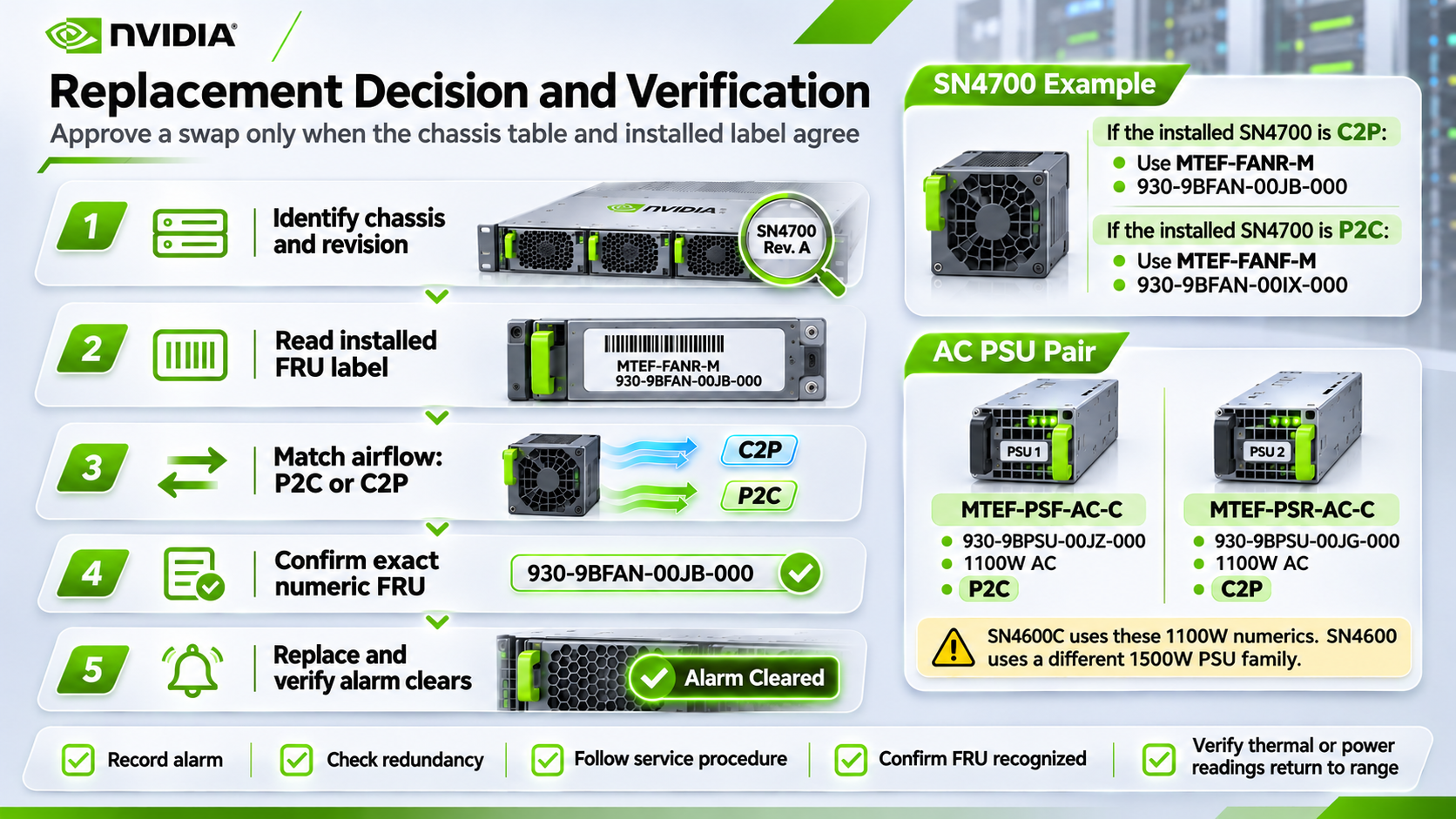
After replacement, check the installed unit, cooling direction and equipment alarms.
Buying guide for replacement fans and power supplies
Include chassis OPN and hardware revision, photos of the failed module and labels, numeric replacement part, airflow direction and power input. Confirm the supported removal procedure and available redundancy before scheduling work. After replacement, verify that the chassis recognizes the module, that the fan or power alarms clear, and that the switch remains inside its operating envelope. SwitchInfra NVIDIA FRU selection guide
Frequently asked questions
What can the installed spare label tell me that its color cannot?
Read the numeric FRU, model and airflow direction from the labels. The chassis manual ties that number to the supported enclosure and service procedure. Verify the chassis and module in the work order before changing the hardware. NVIDIA SN4000 replacement table
Can I use the same MTEF PSU in an SN4600 and an SN4600C?
Use the two model rows in the SN4000 hardware manual. It identifies different PSU families and power ratings for those chassis. Order the exact model and airflow requested against the installed unit. NVIDIA SN4000 power supply entries
Acronyms and terms
- FRU means field-replaceable unit. PSU means power supply unit.
- P2C means power-to-connector. C2P means connector-to-power.
- AC means alternating current. OPN means ordering part number.
- OEM means original equipment manufacturer. Use its designated service part when the chassis is OEM-branded.