
Switching platforms
Cisco ACI leaf–spine selection: separate fabric links from server ports
Count fabric and server interfaces separately before selecting optical channels.
A leaf–spine diagram is a starting topology, not a finished switch-and-optics order. Fabric ports, server ports and external connectivity compete for different resources.
The short answer
Choose supported ACI roles and software first. Then budget leaf-to-spine links separately from server-facing ports, size capacity in normal and failed states, and select each optical channel from its actual route.
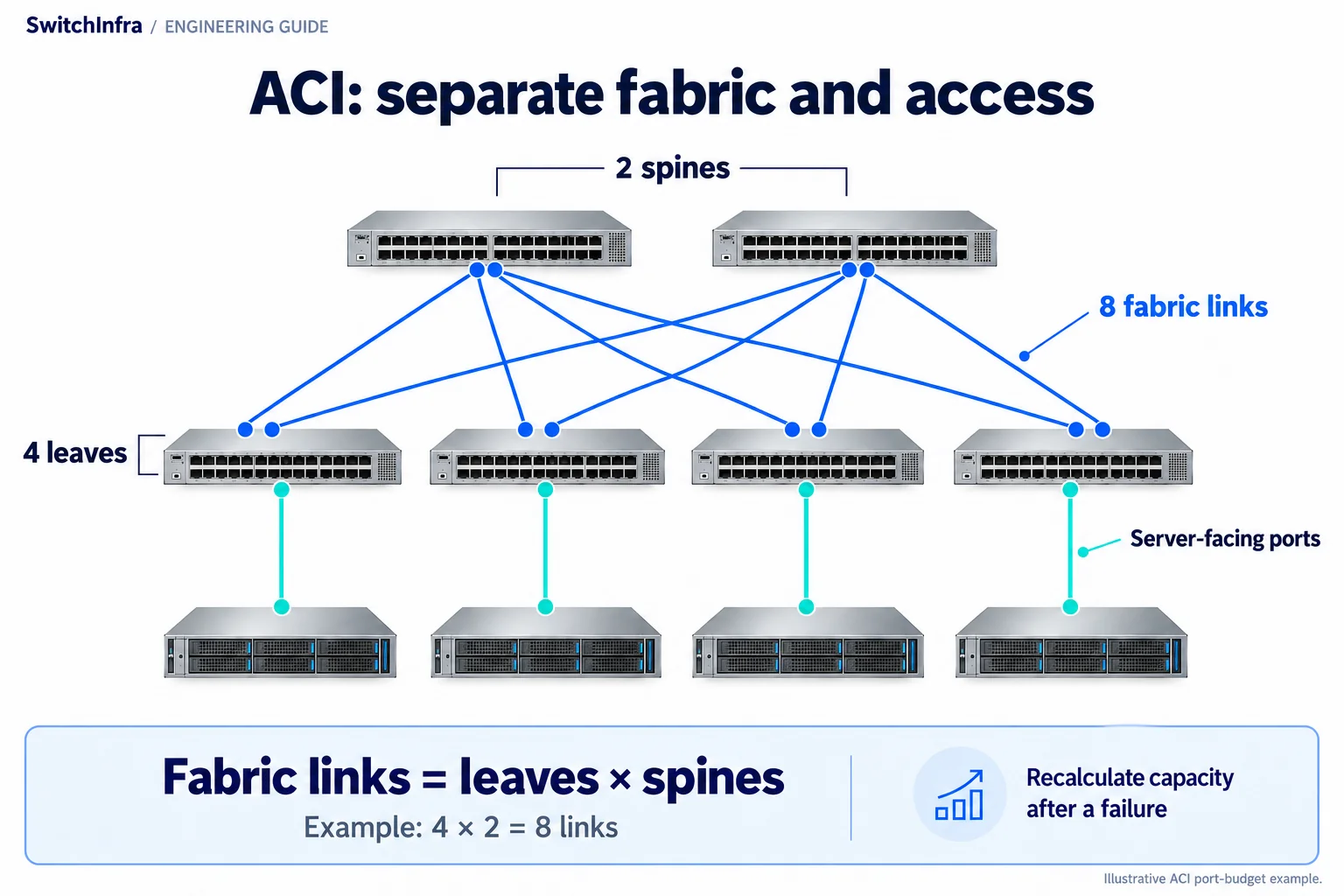
Count every leaf-to-spine link and reserve server-facing ports separately before choosing optics and cables. Conceptual illustration; equipment shapes are illustrative.
Official technical sources · Independent analysis by SwitchInfra
This is a documented design analysis, not a customer deployment claim. Candidate roles require verification for your configuration.
Fabric — leaf-to-spine connectivity
Access — server-facing connections
L × S — illustrative one-link fabric count
Failure — capacity must be recalculated
What the technical reference establishes
Cisco’s ACI design guide describes leaf and spine connectivity and distinguishes fabric-facing and endpoint-facing roles. It directs readers to the optics matrix for supported modules.
The exercise below uses a simple two-tier fabric as an independent sizing example. It does not imply a particular university deployment or that one listed leaf platform can satisfy every fabric scale and feature requirement.
Architecture — The standard two-tier pattern connects leaves through spines.
Roles — Host access and fabric connectivity are different port assignments.
Support — ACI mode and release require their own platform review.
Optics — The topology does not choose media, reach or PMD.
Scope of the analysis: Independent engineering analysis of official documentation. The design exercises are illustrative; this guide does not describe a customer deployment.
Work through the engineering choices
Start with the documented constraint, then state the conditions for the proposed equipment role.
Define the fabric roles before choosing SKUs
The official guide distinguishes fabric and endpoint connectivity.
Design exercise: Design exercise: plan a small two-tier fabric with separately sized external connectivity.
List the server attachment, border connectivity and management requirements. Choose a supported leaf role for each function and select spine capacity from the full leaf count and growth plan. Do not infer a device’s spine suitability merely from how many fast ports appear on its front panel.
Specify the ACI release and required features as part of the platform selection. An NX-OS breakout statement or generic Nexus data sheet is not enough to approve the same operation in ACI mode. Keep the controller, licenses and operational requirements in the system scope rather than quoting only the switches.
Cisco ACI design guide · Cisco Nexus FX3 platform data sheet
Conditional ACI leaf platform candidate
Verify ACI release, role support, licensing, uplink allocation and the complete bundle.
Count fabric links without double-counting endpoint ports
The guide documents leaf-to-spine connections within a pod.
Design exercise: Design exercise: four leaves and two spines, with one link per leaf–spine pair.
In that illustrative arrangement, four times two gives eight physical fabric links, sixteen switch-port ends and, if all are optical, sixteen corresponding transceiver positions. These counts come from the stated example, not from Cisco’s required size for every deployment. More links per pair change the count.
Next calculate capacity per leaf. Two usable 100G fabric links provide 200 Gbps of nominal one-direction capacity; losing one leaves 100 Gbps in this example. Compare that surviving capacity with the chosen workload. Do not describe multiple paths as validated resilience until the failure behavior and recovery requirements have been checked.
Select optics per route and per host mode
The guide points to host-specific optical support information.
Design exercise: Conditional choice: single-mode fabric optics and a separate server-facing optical design.
For every fabric route, record both switch ports, distance, media, termination and channel loss. Evaluate the candidate PMD and peer combination only after that information is available. A short row-to-row route and a longer inter-room path may justify different choices even at the same fabric rate.
Keep server optics in a different BOM group because the NIC, FEC and access media may differ. Record spare quantities after the final design is agreed. The resulting quote should include a leaf/spine port schedule, software and licensing scope, controller requirements and every channel’s assumptions, not just a diagram with repeated 100G labels.
Cisco ACI design guide · Cisco 100G QSFP data sheet · Cisco 25G SFP28 data sheet · Cisco optics compatibility matrix
QSFP-100G-CWDM4-S
Conditional fabric-link optical candidate
Use only with verified ACI host support, matching peer and channel.
QSFP-100G-LR4-S
Alternative single-mode fabric optic
A different PMD choice; not a universal fabric requirement.
SFP-25G-SR-S
Conditional server-facing optic
Assess the server NIC, multimode channel, platform and FEC separately.
Ask for a fabric schedule, not an assumed bundle
Attach the reference topology and make every independent sizing assumption explicit.
Cisco ACI design guide · Cisco optics compatibility matrix
Roles and software
ACI release, leaf/spine roles, controllers, licenses and required features.
Port and capacity plan
Leaf count, links per pair, server ports, border ports and surviving capacity.
Channels
Both endpoint PIDs, supported optics, routes, media, loss and spares.
Candidate models and selection boundaries
These are conditional model or product-family inquiries for the documented equipment roles. Confirm the required rate and complete channel before finalizing any line.
| Model / family and status | Role and condition |
|---|---|
| N9K-C93180YC-FX3 Conditional listed platform | Conditional ACI leaf platform candidate Verify ACI release, role support, licensing, uplink allocation and the complete bundle. Cisco Nexus FX3 platform data sheet |
| QSFP-100G-CWDM4-S Conditional model inquiry | Conditional fabric-link optical candidate Use only with verified ACI host support, matching peer and channel. Cisco 100G QSFP data sheet |
| QSFP-100G-LR4-S Conditional model inquiry | Alternative single-mode fabric optic A different PMD choice; not a universal fabric requirement. Cisco 100G QSFP data sheet |
| SFP-25G-SR-S Conditional model inquiry | Conditional server-facing optic Assess the server NIC, multimode channel, platform and FEC separately. Cisco 25G SFP28 data sheet |
FX3 is verified as catalog product 7512, on request. The optical models remain model inquiries; neither the listing nor this reference discussion validates a complete ACI fabric, software bundle or module pairing.
Continue in the relevant product family
Use the analysis to define the role before comparing catalog options.
Discuss this project
Carry the route, media, endpoint and loss requirements into the inquiry. Leave unknown quantities blank; reference port and fiber counts are not an equipment BOM.
Follow the next selection question.
Compare related decisions while keeping each source’s scope, hardware and link conditions separate.
Browse more engineering analyses →
Catalyst 9400 expansion: quote the whole system
Supervisor choice changes the slot bandwidth behind forty-eight optical ports.
Read the engineering analysisOfficial technical source
Campus versus server access: read both port rows
Endpoint rate and shared uplink capacity require different checks.
Read the engineering analysisOfficial technical source
Nexus 3172 reuse: check the remaining horizon
Review copper access, the separate optical uplink and the actual support scope.
Read the engineering analysisOfficial technical source
Before you finalize the channel
Is a fast Nexus switch automatically an ACI spine?
No. Verify the exact platform’s supported role and release.
Are NX-OS and ACI port-mode approvals interchangeable?
No. Check the operating mode and its own support documentation.
Does a dual path prove the required failover behavior?
No. Validate the intended failure and recovery conditions.
Does the reference architecture mandate LR4 everywhere?
No. Choose a supported optical PMD for each actual channel.
Trace the project facts and technical limits
- Cisco ACI design guide
- Cisco Nexus FX3 platform data sheet
- Cisco 100G QSFP data sheet
- Cisco 25G SFP28 data sheet
- Cisco optics compatibility matrix
Source check: 19 October 2026. Catalog status is stated per candidate.
Official sources checked 19 October 2026. Final host, software, channel and offered-unit compatibility require project-specific verification.